17 Administrative Assistant Resume Examples and Templates
- ATS Friendly
- Admin Specific
- 17 Real Examples
A hiring manager scans an administrative assistant resume for two things: the executives and teams you keep on track, and the tools you keep them on. Pick a template below, then model your own on a real example built for your seat, from an entry-level assistant to an executive assistant. Every example leads with the calendars, travel, records, or events you own and one modest number you can back up.


540k+ resumes created
Administrative assistant resume templates, sorted by role and level
Each template below is a real administrative assistant resume laid out in that format, grouped by specialty and seniority. Choose one, then swap in your own executives supported, calendar and travel scope, systems, and the events and records you own. Every layout keeps your name, title, and dates clean so a hiring manager reads your results in one pass and an applicant tracking system parses it without trouble.
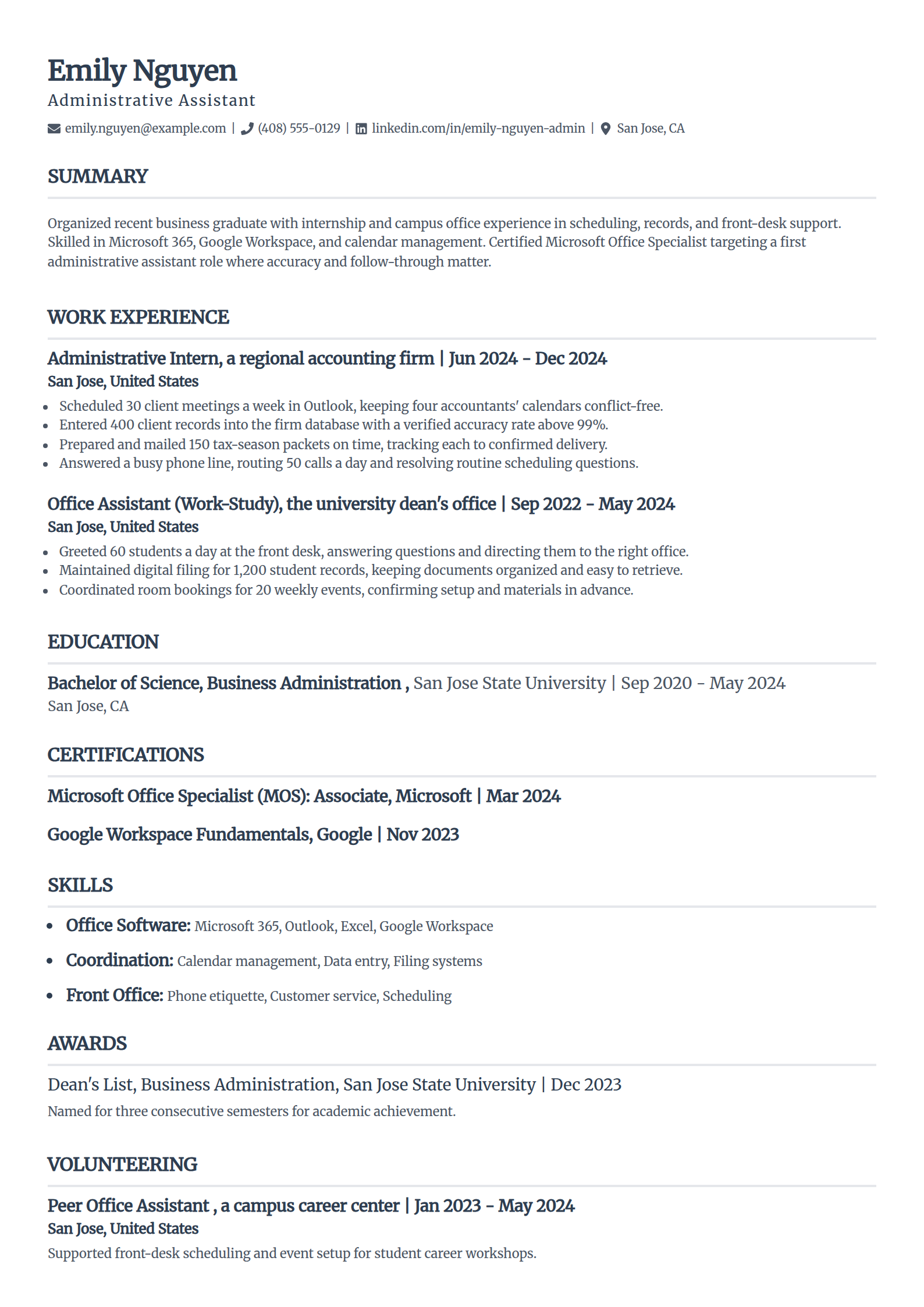
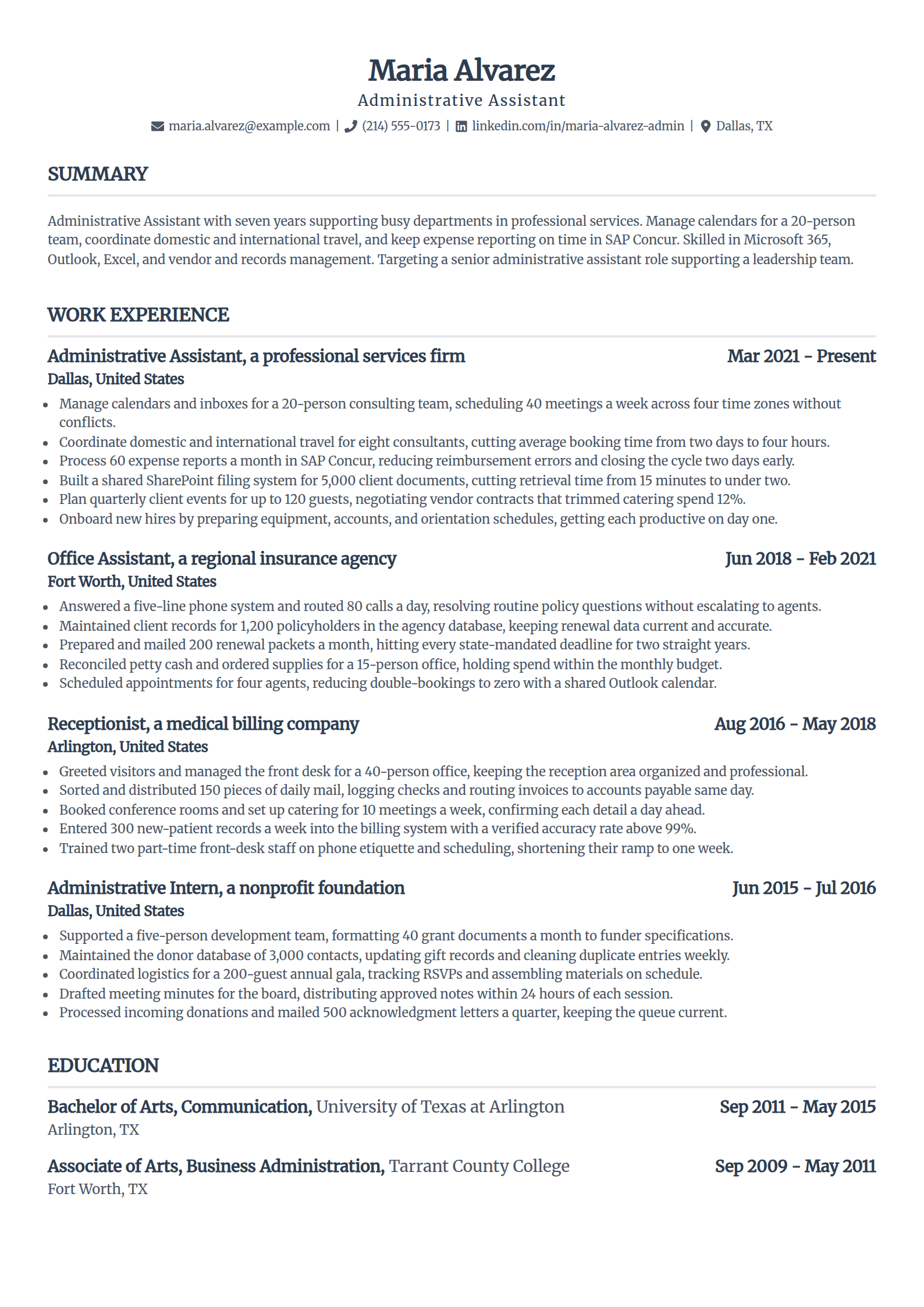
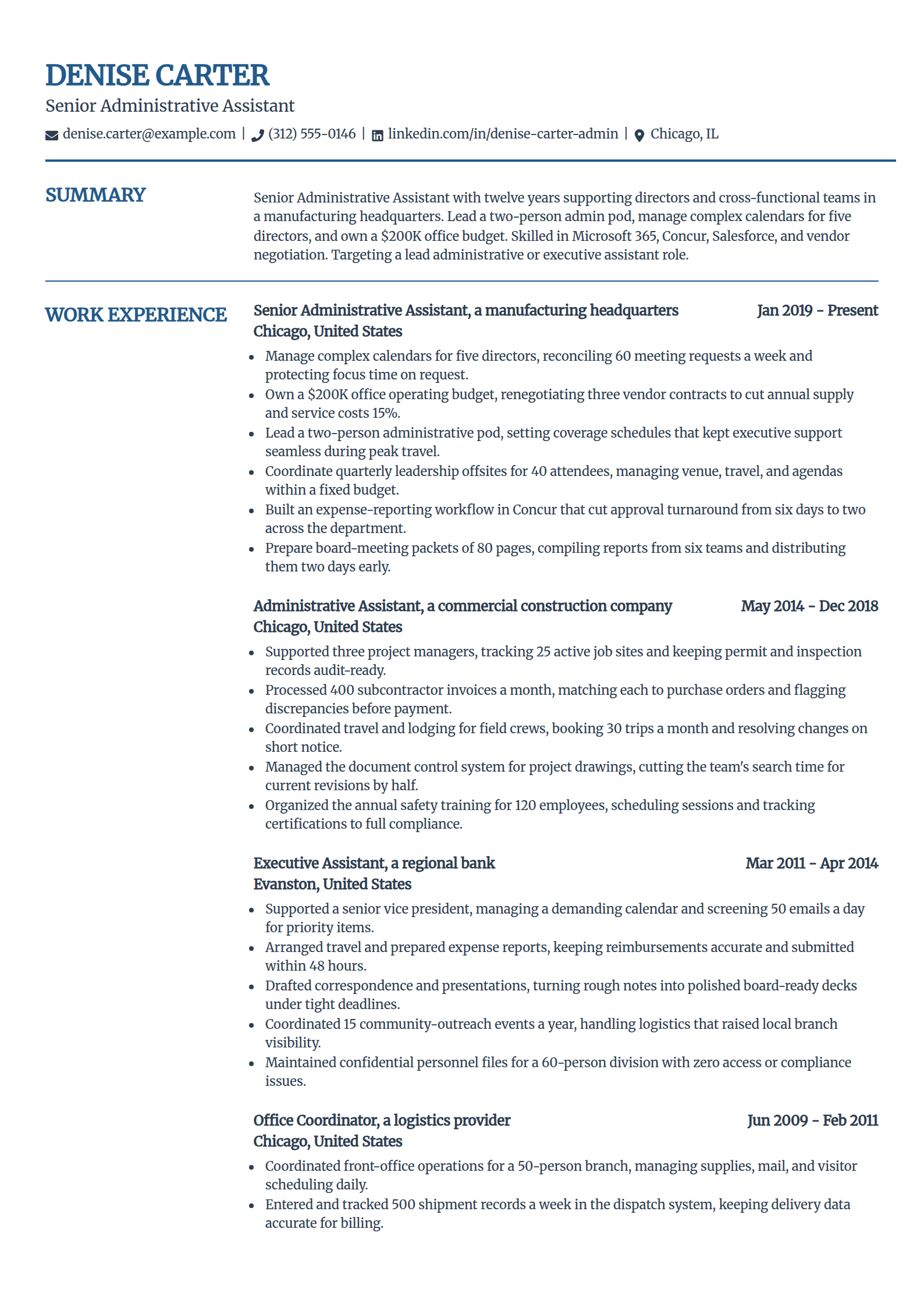
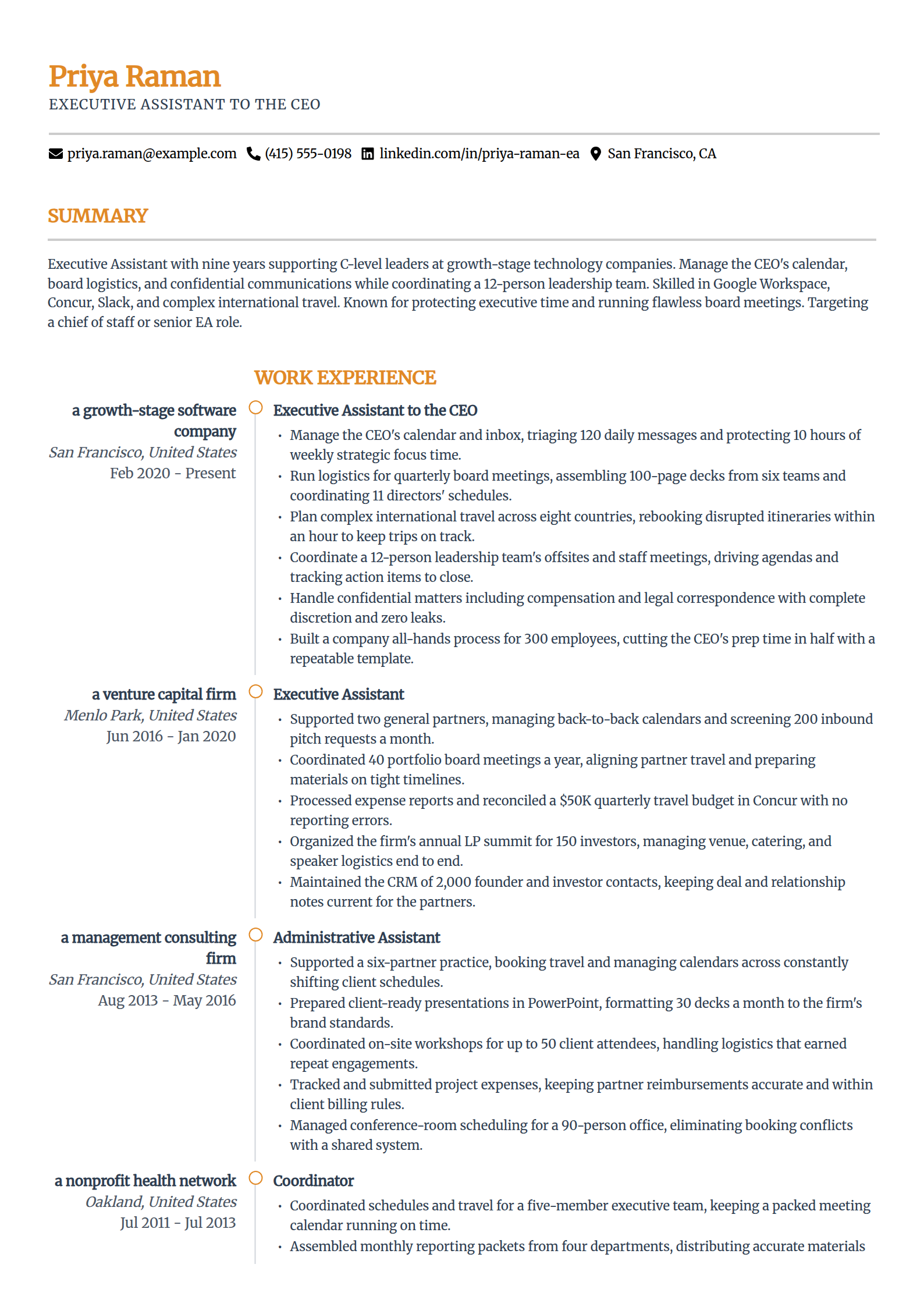
Entry-Level Administrative Assistant Resume Template
Why this resume example works?
- Leads with real hands-on work, scheduling 30 client meetings a week during an accounting-firm internship.
- Shows accuracy a first office job wants, entering 400 client records above 99% accuracy.
- Fills a strong one-page resume before the first full-time role with an internship plus campus work-study.
- Names the tools a posting screens for, Microsoft 365, Outlook, and Google Workspace, backed by an MOS certificate.
- Uses a clean single-column layout that reads cleanly for an entry-level applicant and passes ATS.
Experienced Administrative Assistant Resume Template
Why this resume example works?
- Opens with the scope a hiring manager reads first, managing calendars and inboxes for a 20-person team.
- Proves process work, building a SharePoint filing system that cut document retrieval from 15 minutes to two.
- Quantifies the support, coordinating travel for eight consultants and cutting booking time from two days to four hours.
- Names the systems a posting lists, Microsoft 365, SAP Concur, and vendor and records management.
- Uses a single-column layout that keeps a seven-year history readable and ATS-safe on one page.
Senior Administrative Assistant Resume Template
Why this resume example works?
- Leads with lead-level scope, managing complex calendars for five directors and a two-person admin pod.
- Shows ownership beyond scheduling, running a $200K office budget and renegotiating contracts to save 15%.
- Ties work to outcomes, building a Concur workflow that cut expense approvals from six days to two.
- Carries the credentials the seat expects, a CAP with an Organizational Management specialty.
- Uses a structured layout that keeps a twelve-year record organized and easy for a parser to read.
Executive Assistant Resume Template
Why this resume example works?
- States the scope an EA is hired for, managing the CEO's calendar and protecting 10 hours of weekly focus time.
- Shows board-level work, assembling 100-page board decks from six teams and aligning 11 directors' schedules.
- Proves judgment under pressure, rebooking disrupted international travel within an hour to keep trips on track.
- Signals discretion, handling confidential compensation and legal matters with a clean record.
- Uses a polished layout that carries a nine-year C-level record without crowding the page.
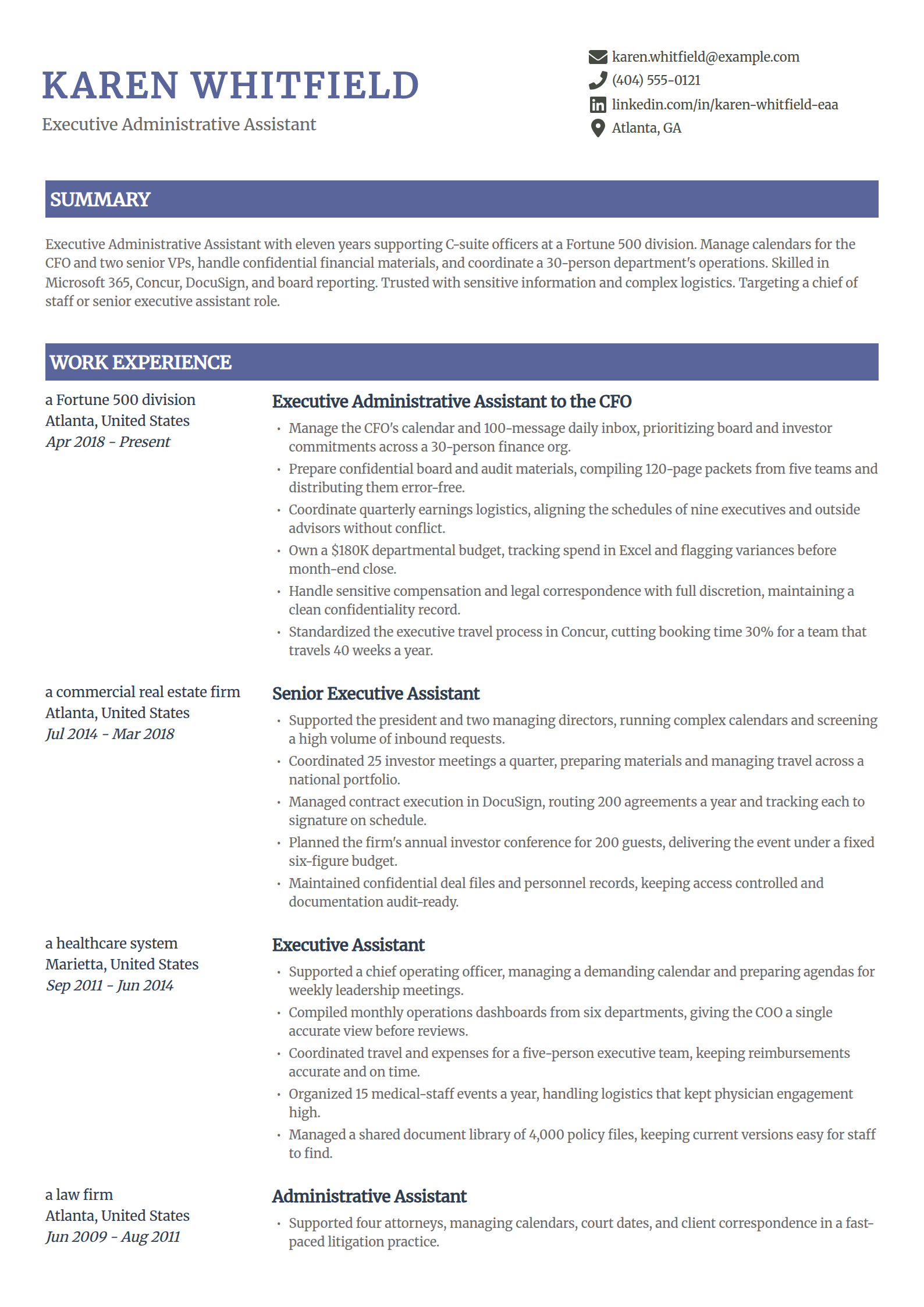
Executive Administrative Assistant Resume Template
Why this resume example works?
- Opens with C-suite scope, supporting a CFO and prioritizing board and investor commitments across a finance org.
- Shows the trust the seat demands, preparing confidential 120-page board and audit packets error-free.
- Quantifies the operations side, owning a $180K departmental budget and flagging variances before close.
- Names the specialty work a posting lists, earnings logistics, DocuSign, and SAP Concur travel.
- Uses a two-column layout that separates leadership support from the systems and standards.
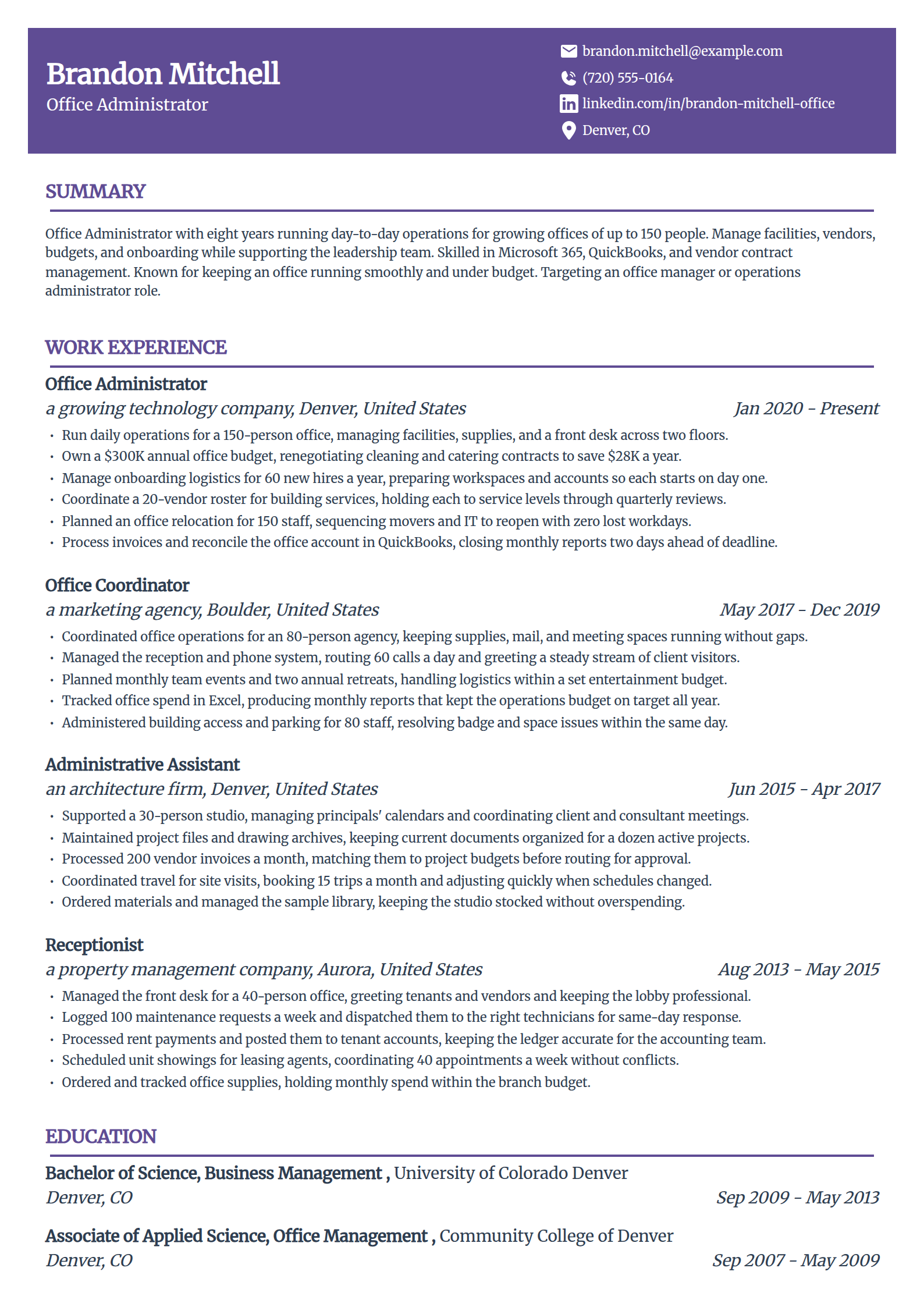
Office Administrator Resume Template
Why this resume example works?
- Leads with operations scope, running a 150-person office across two floors and a $300K annual budget.
- Shows a cost win, renegotiating cleaning and catering contracts to save $28K a year.
- Proves project ownership, sequencing an office relocation for 150 staff with zero lost workdays.
- Names practical tools, Microsoft 365, QuickBooks, and vendor contract management.
- Uses a single-column layout that fills one page with real operations results.
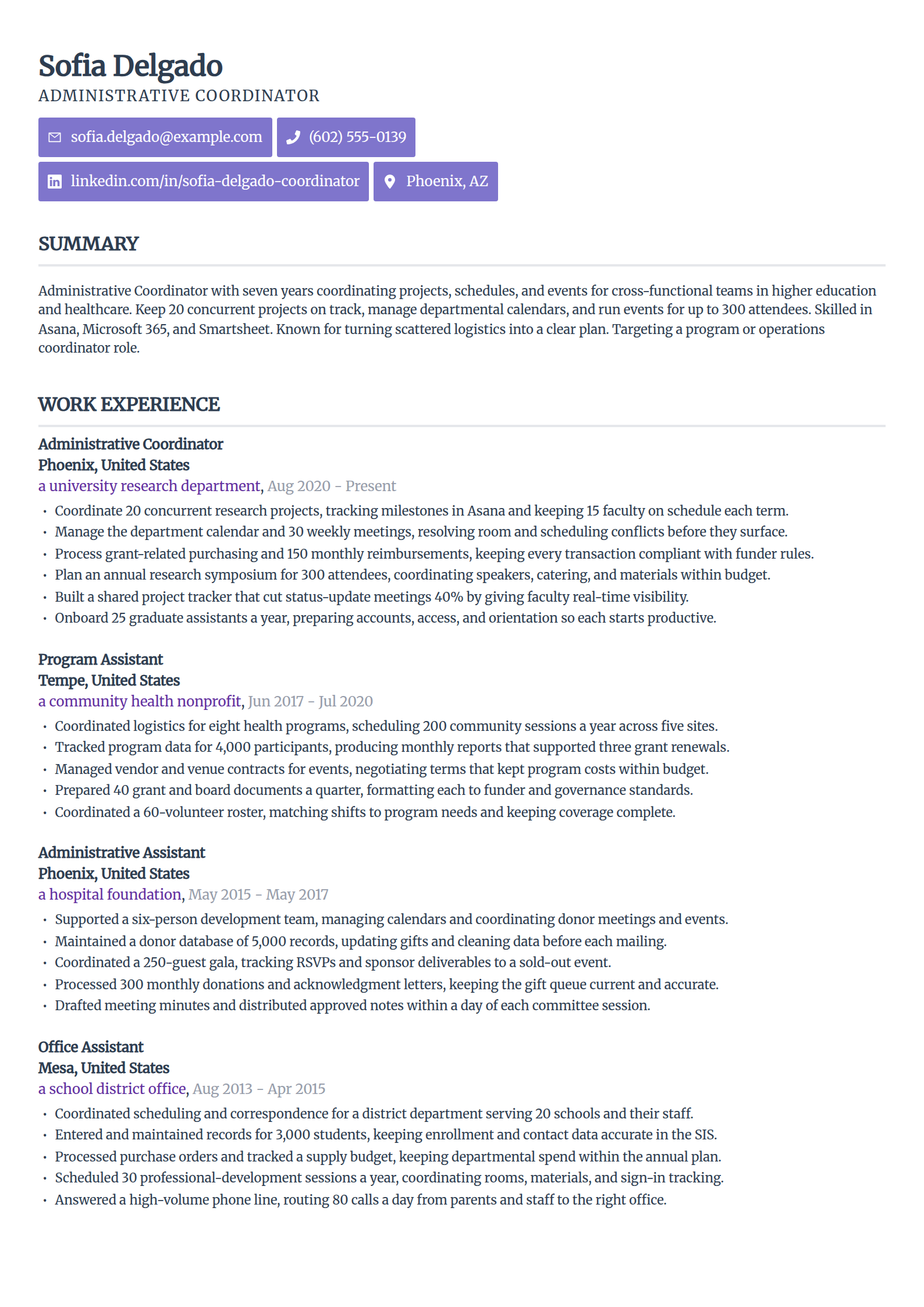
Administrative Coordinator Resume Template
Why this resume example works?
- Leads with coordination scope, keeping 20 concurrent projects and 15 faculty on schedule in Asana.
- Shows an efficiency win, building a shared tracker that cut status meetings 40%.
- Quantifies event work, planning a 300-attendee symposium within budget.
- Names the tools a coordinator posting screens for, Asana, Smartsheet, and Microsoft 365.
- Uses a modern layout that keeps dense project detail organized and ATS-safe.
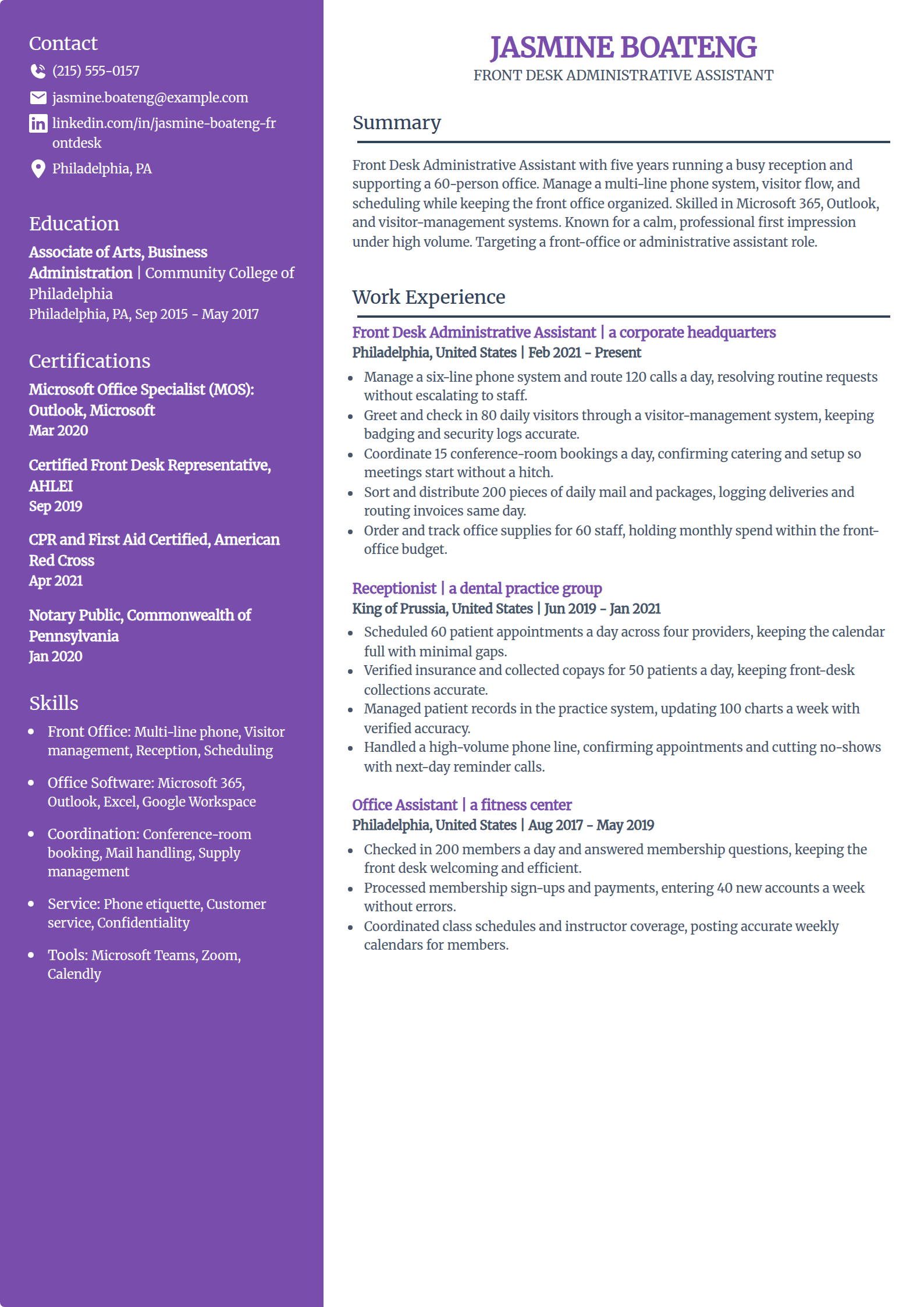
Front Desk Administrative Assistant Resume Template
Why this resume example works?
- Leads with front-office volume, managing a six-line phone system and routing 120 calls a day.
- Shows the security-aware side, checking in 80 daily visitors through a visitor-management system.
- Quantifies coordination, booking 15 conference rooms a day with catering and setup confirmed.
- Names the skills a reception posting lists, phone etiquette, scheduling, and Microsoft 365.
- Uses a clean layout that keeps a focused front-desk record scannable and parser-friendly.
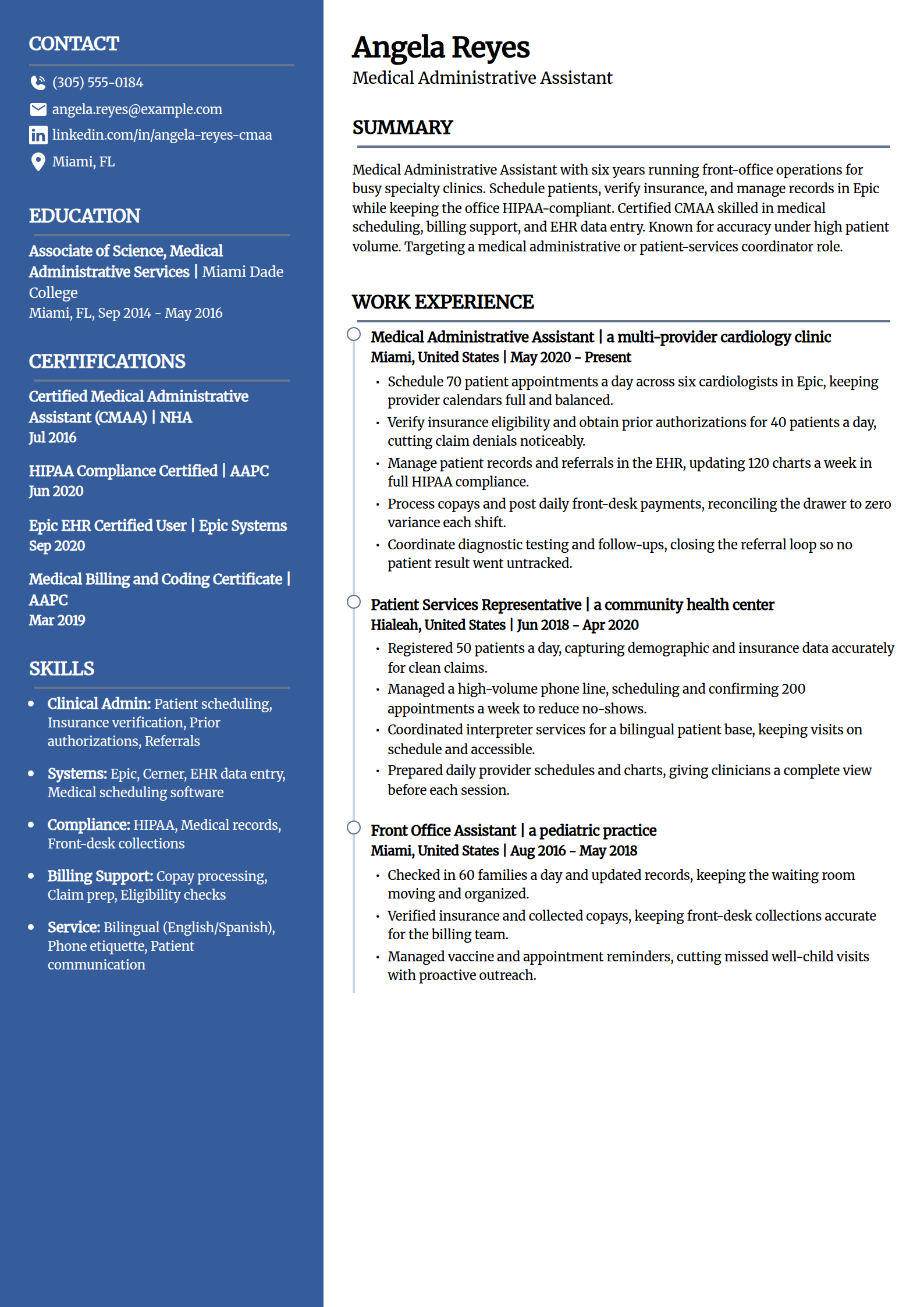
Medical Administrative Assistant Resume Template
Why this resume example works?
- Leads with clinical front-office scope, scheduling 70 appointments a day across six cardiologists in Epic.
- Shows a result a clinic values, verifying insurance and prior authorizations to cut claim denials.
- Signals compliance, updating 120 charts a week in full HIPAA compliance.
- Carries the exact credential mix a posting names, a CMAA with Epic and HIPAA certifications.
- Uses a distinctive layout that stays ATS-safe while setting a healthcare resume apart from a plain list.
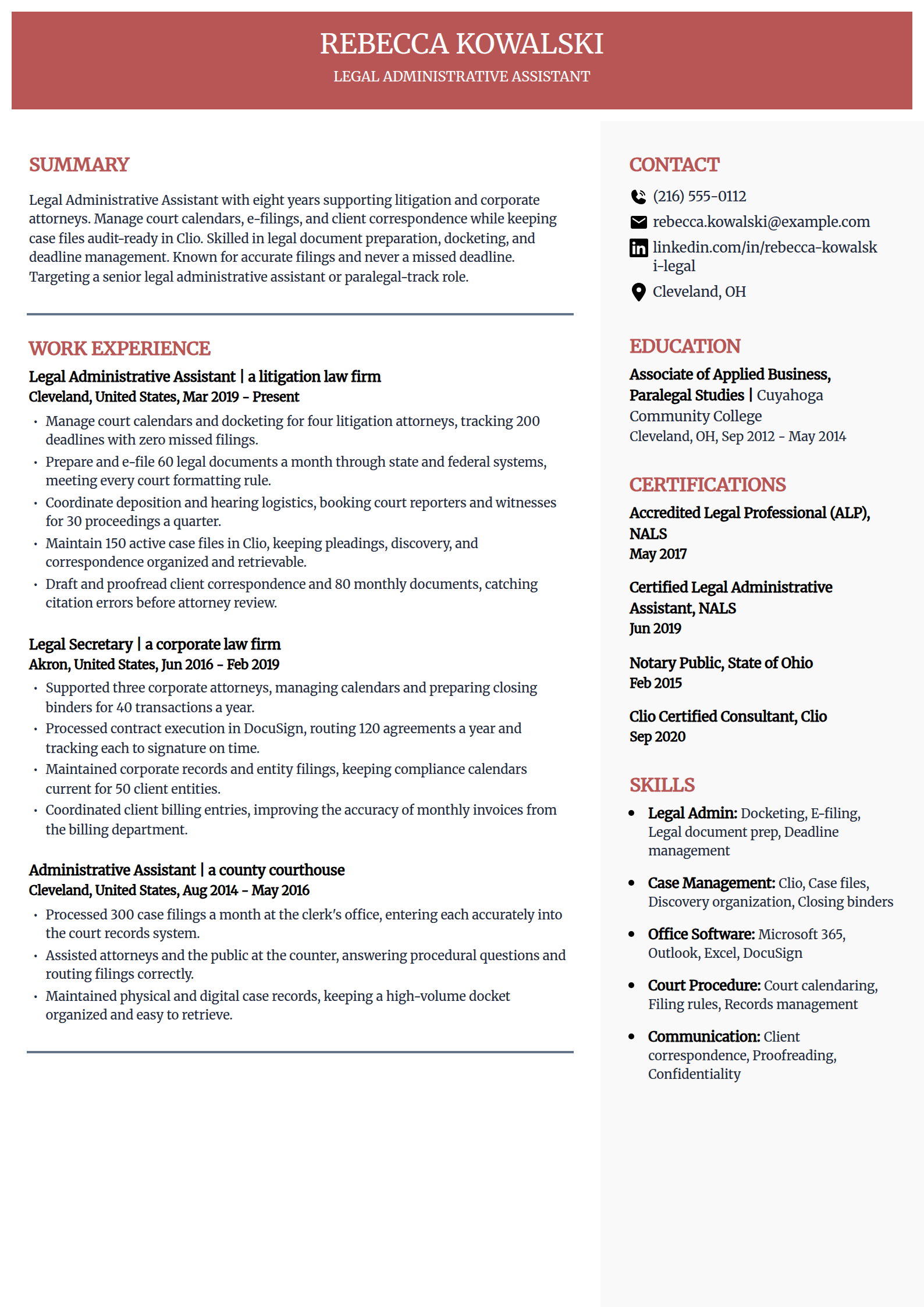
Legal Administrative Assistant Resume Template
Why this resume example works?
- Leads with the accuracy the role lives on, managing docketing for four attorneys with zero missed filings.
- Shows specialty volume, e-filing 60 legal documents a month through state and federal systems.
- Names the field's tools, Clio, docketing, e-filing, and deadline management.
- Carries relevant credentials, an Accredited Legal Professional and a Clio consultant certification.
- Uses a two-column layout that keeps case detail organized and easy for a parser to read.
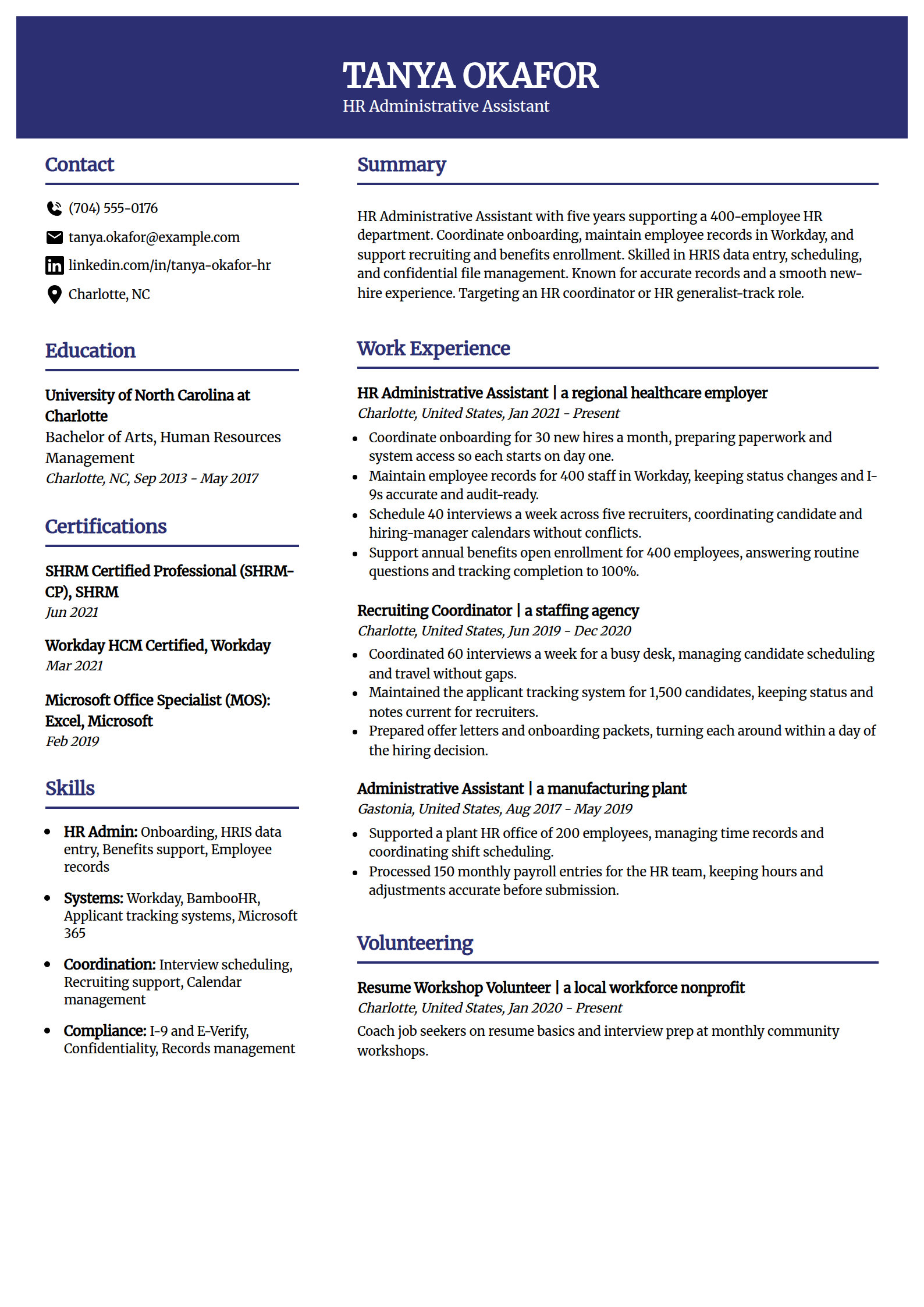
HR Administrative Assistant Resume Template
Why this resume example works?
- Leads with HR scope, coordinating onboarding for 30 new hires a month so each starts on day one.
- Shows systems depth, maintaining 400 employee records in Workday, audit-ready with accurate I-9s.
- Quantifies recruiting support, scheduling 40 interviews a week across five recruiters without conflicts.
- Names the credentials an HR-track posting rewards, a SHRM-CP and Workday HCM certification.
- Uses a spacious layout that keeps a focused HR record clean and easy to skim.
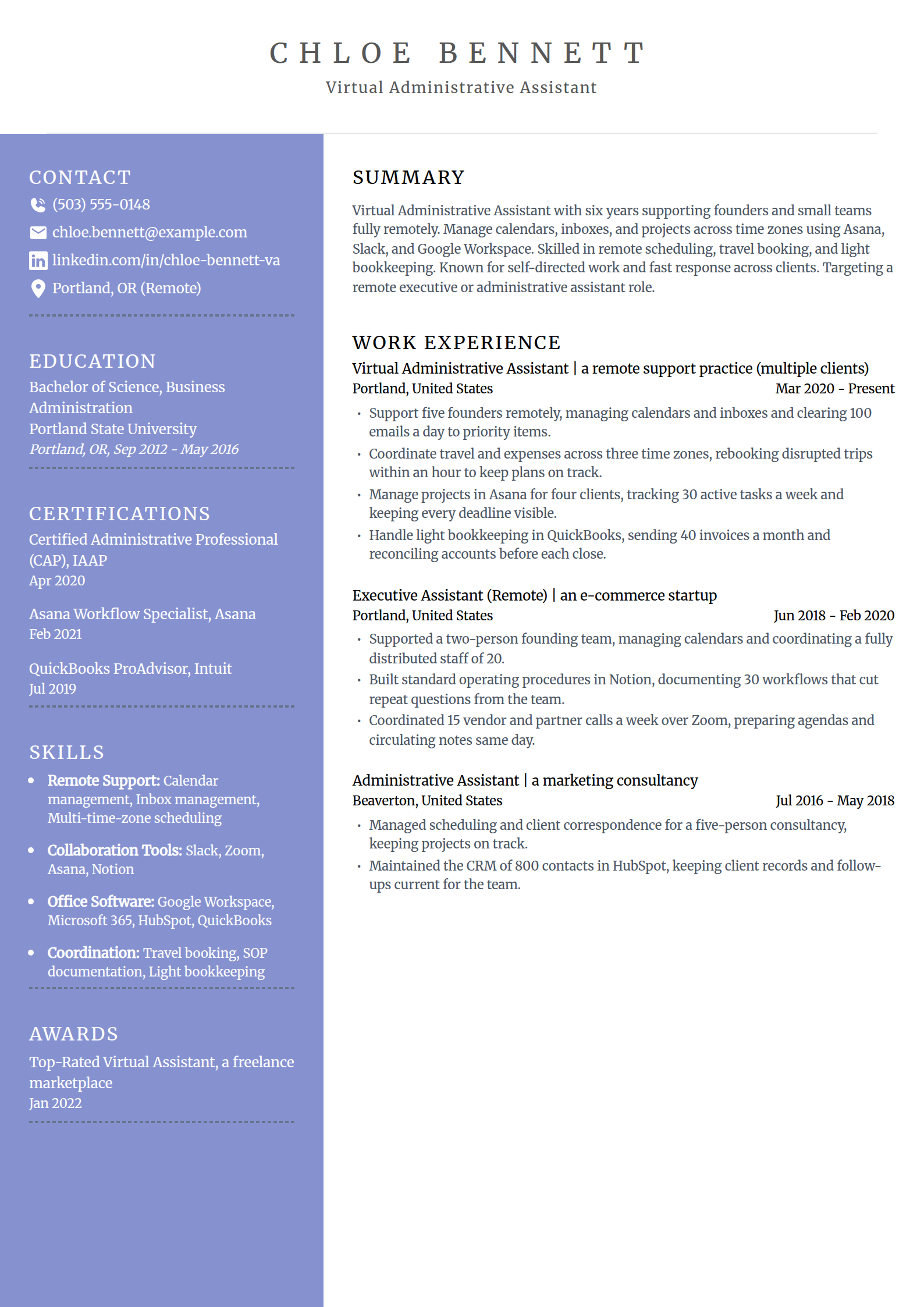
Virtual Administrative Assistant Resume Template
Why this resume example works?
- Leads with remote scope, supporting five founders and clearing 100 emails a day to priority items.
- Shows self-directed value, building 30 documented workflows in Notion that cut repeat questions.
- Quantifies the bookkeeping side, sending 40 invoices a month in QuickBooks and reconciling before close.
- Names the remote toolkit a posting screens for, Slack, Zoom, Asana, and Google Workspace.
- Uses a clean layout that keeps a remote-support record focused and ATS-safe.
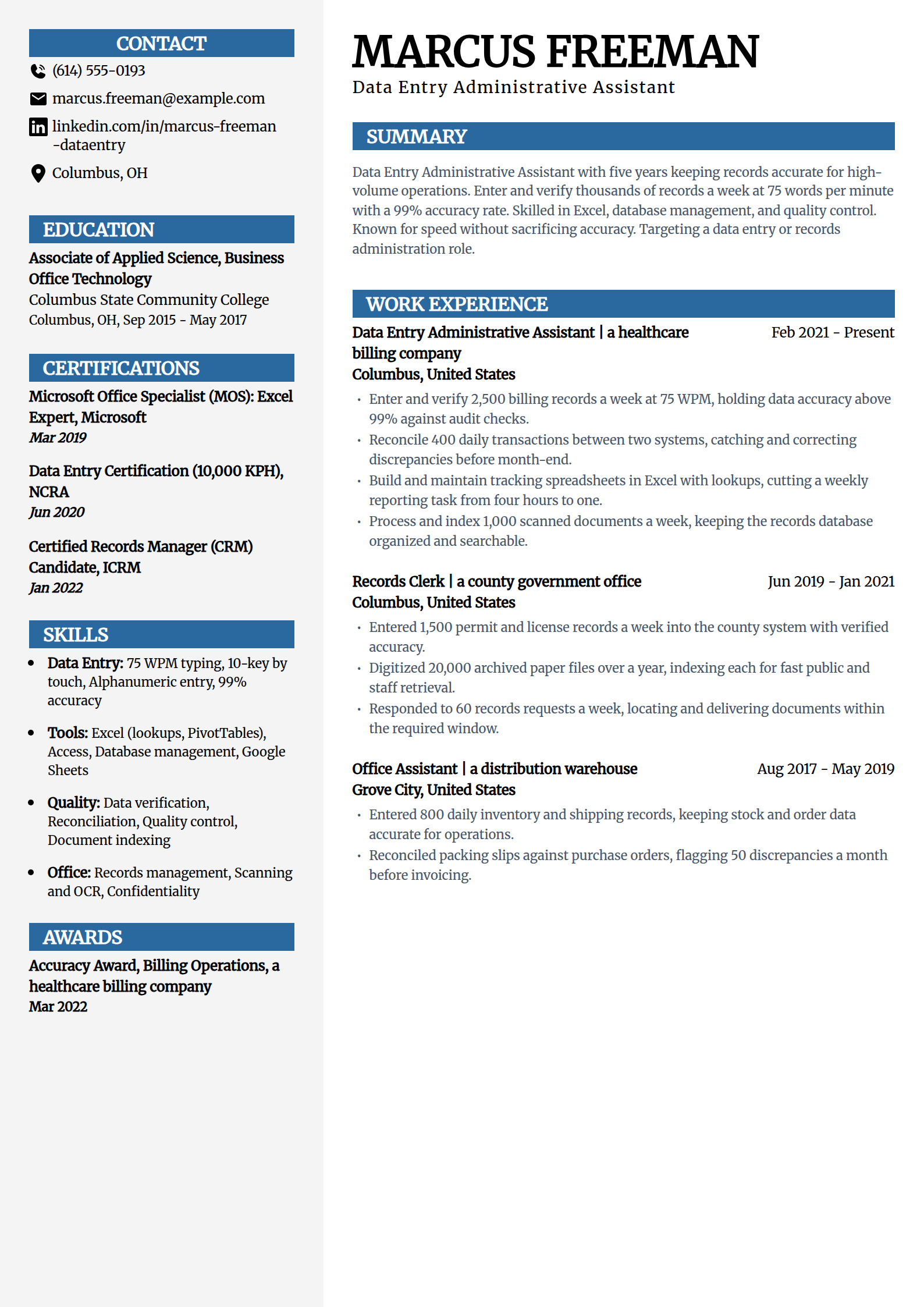
Data Entry Administrative Assistant Resume Template
Why this resume example works?
- Leads with speed and accuracy, entering 2,500 records a week at 75 WPM above 99% accuracy.
- Shows a reconciliation win, matching 400 daily transactions between two systems before month-end.
- Quantifies an efficiency gain, building Excel trackers that cut a weekly report from four hours to one.
- Names the skills a data posting lists, Excel lookups, 10-key, and quality control.
- Uses a structured layout that keeps a focused data-entry record organized and parser-friendly.
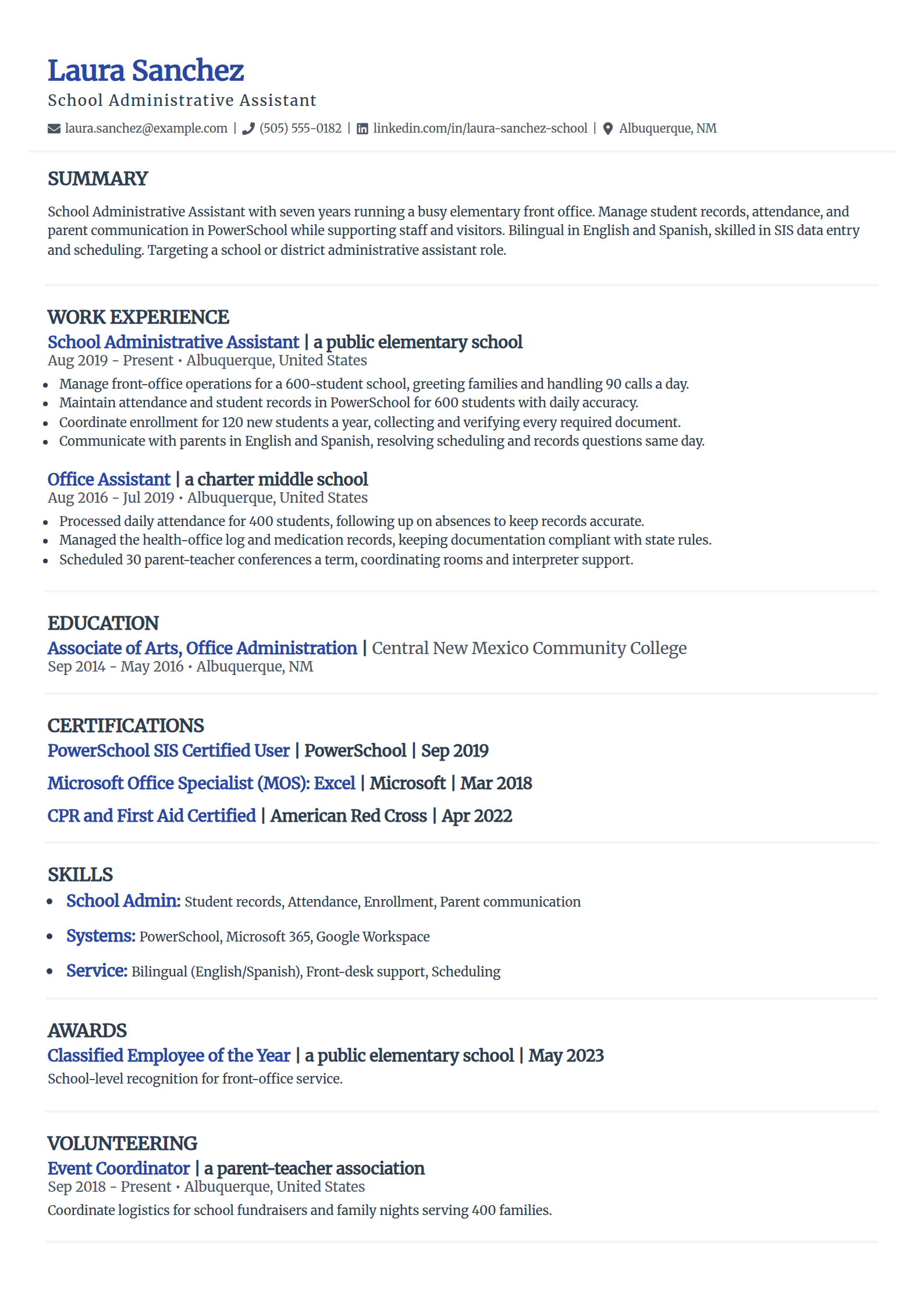
School Administrative Assistant Resume Template
Why this resume example works?
- Leads with school front-office scope, running the office for a 600-student school and handling 90 calls a day.
- Shows systems fluency, maintaining attendance and student records in PowerSchool with daily accuracy.
- Adds a real differentiator, communicating with parents in English and Spanish to resolve questions same day.
- Names the tools a district posting lists, PowerSchool, Microsoft 365, and enrollment processing.
- Uses a refined layout that keeps a focused school record clean and ATS-safe.
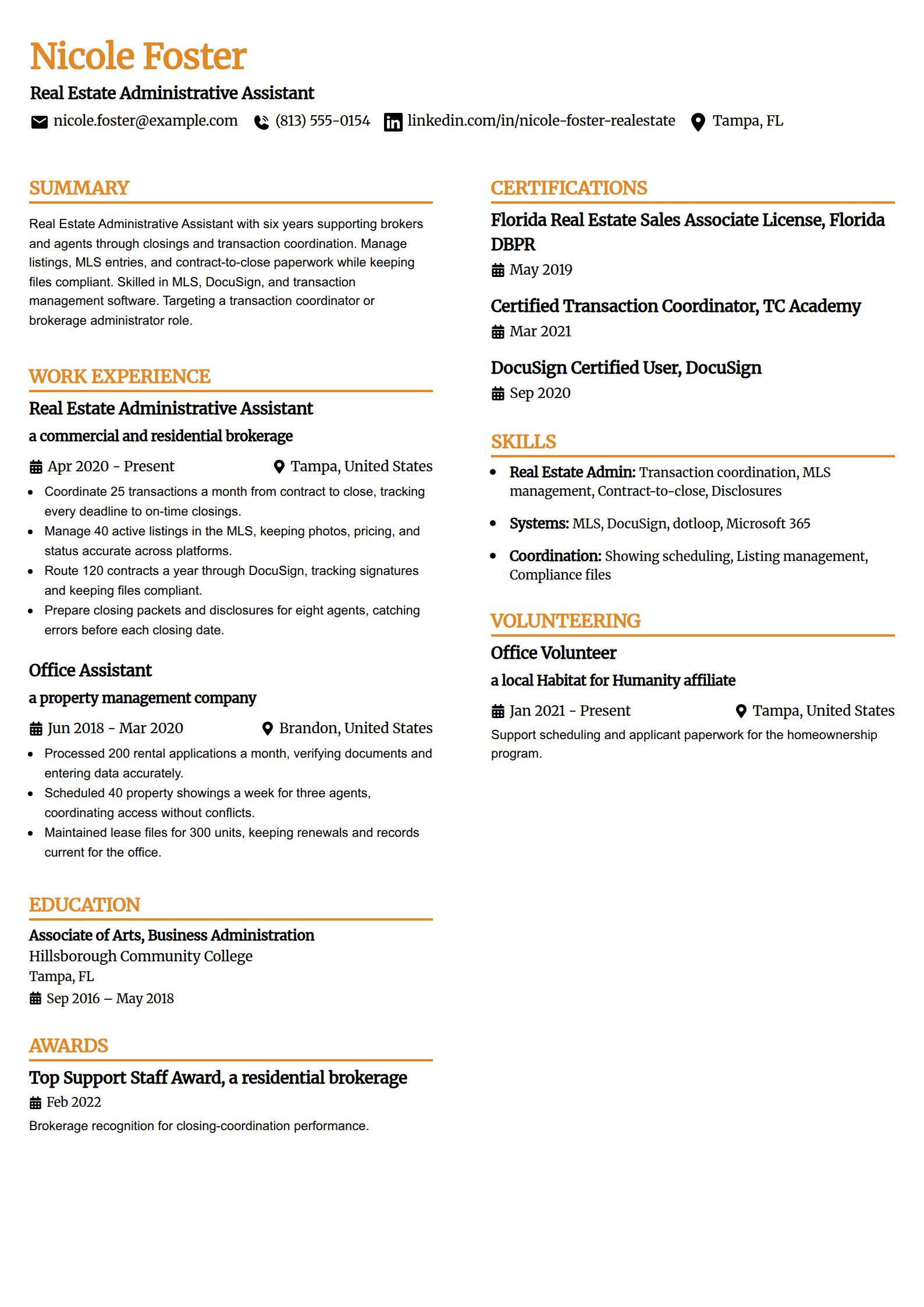
Real Estate Administrative Assistant Resume Template
Why this resume example works?
- Leads with transaction scope, coordinating 25 deals a month from contract to close on time.
- Shows listing work, managing 40 active MLS listings with photos, pricing, and status accurate.
- Quantifies compliance throughput, routing 120 contracts a year through DocuSign to signature.
- Names the specialty tools a brokerage posting lists, MLS, DocuSign, and transaction coordination.
- Uses a polished layout that keeps a specialist real estate record organized and parser-friendly.
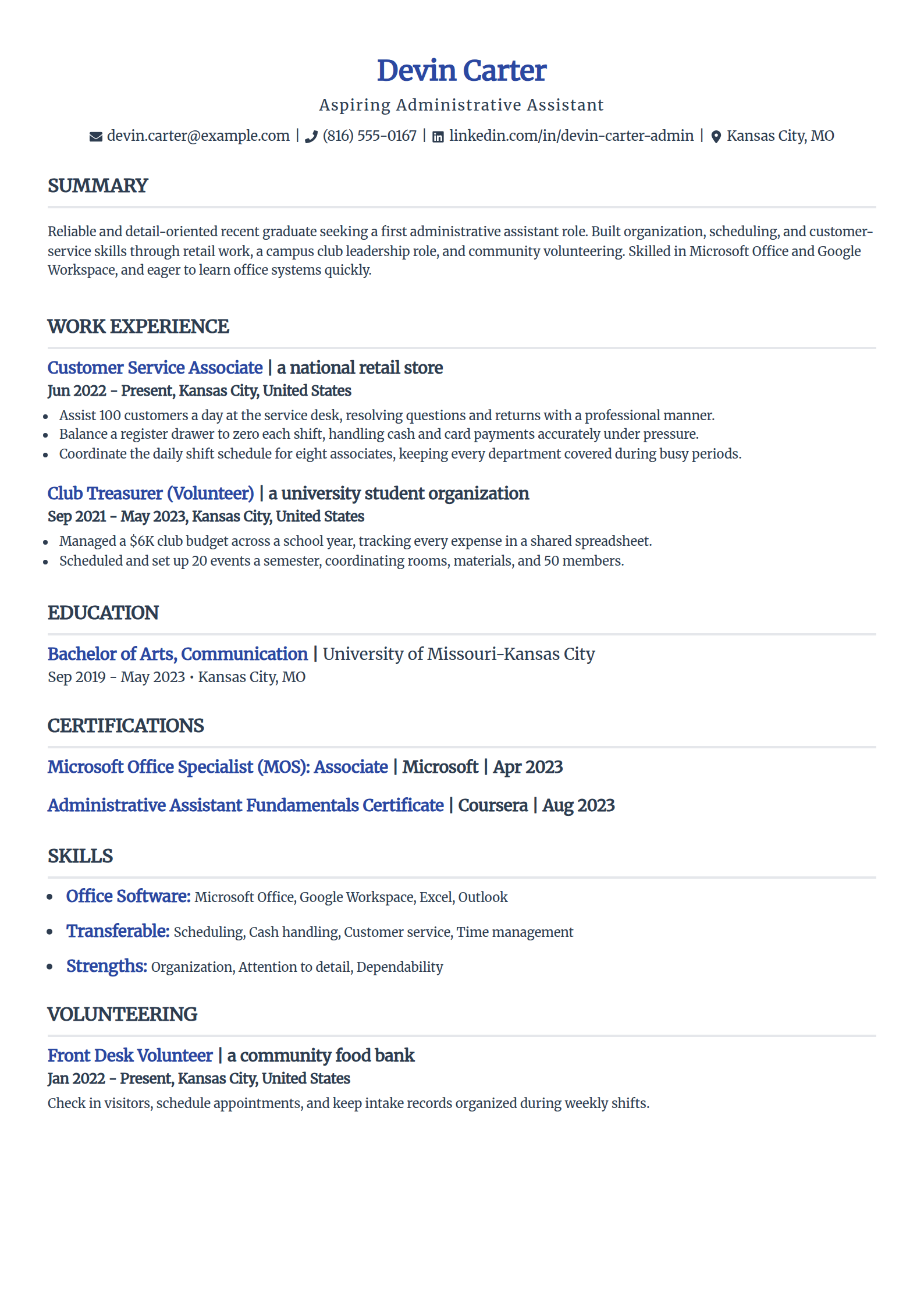
Administrative Assistant Resume With No Experience
Why this resume example works?
- Builds a resume from transferable work, assisting 100 customers a day and coordinating an eight-person schedule.
- Shows leadership a student can claim, managing a $6K club budget as treasurer across a school year.
- Adds community proof, checking in visitors and keeping records at a food bank as a front-desk volunteer.
- Names starter credentials honestly, an MOS Associate and an administrative fundamentals certificate.
- Uses a clean, no-frills layout that fills one page for a first-time applicant and passes ATS.
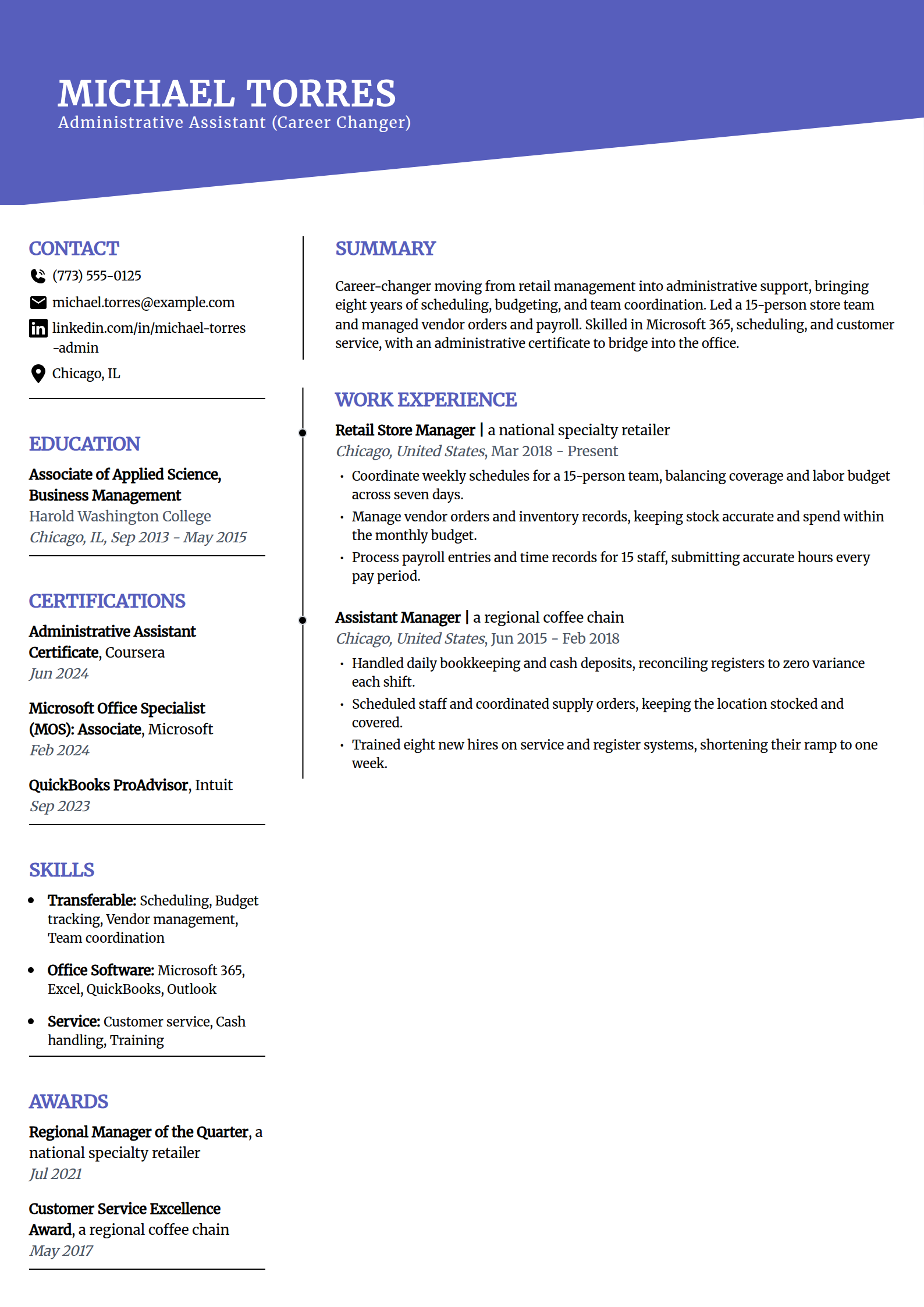
Career-Changer Administrative Assistant Resume Template
Why this resume example works?
- Reframes retail management as admin work, coordinating schedules and a labor budget for a 15-person team.
- Shows the office-relevant tasks, managing vendor orders, inventory records, and payroll entries.
- Proves the bookkeeping crossover, reconciling registers to zero variance each shift.
- Bridges the gap with fresh credentials, an administrative assistant certificate and an MOS.
- Uses a visual layout that leads with transferable skills so a career change reads as a fit.
Build your administrative assistant resume
Pick a template above and the editor keeps your layout clean and ATS-safe while you swap in your own executives supported, calendar and travel scope, systems, and the events and records you own.
Build my resumeHow to write an administrative assistant resume in 2026
A hiring manager reads an administrative assistant resume for scope and reliability: the executives and teams you support, the calendars and travel you keep on track, and the systems you run them on. Lead with who you support and what you keep organized, then attach one modest number to each line. These moves make yours easy to skim and easy for an applicant tracking system to parse.
Open with a summary that states who you support and your scope
Write three to four sentences that name your years and level, who and how many people you support, one or two headline results, and the role you are targeting. Say what you keep organized and on schedule, not what you want from the employer. Put your strongest number, usually the size of the team or the budget you manage, in the opening lines.
Administrative Assistant with 7 years supporting a 20-person consulting team. Manage complex calendars, coordinate domestic and international travel in SAP Concur, and run quarterly client events for up to 120 guests. Skilled in Microsoft 365, Outlook, and vendor and records management. Targeting a senior administrative assistant role supporting a leadership team.
Lead experience with calendars, coordination, and what you kept on track
The work an admin resume is hired for is measurable, so name it and attach one modest number to each bullet. Open every line with a strong verb, never "Responsible for".
- Support: state who and how many you support, like managing calendars and inboxes for a 20-person team.
- Coordination: name the volume, such as booking travel for eight executives or scheduling 40 meetings a week.
- Ownership: show the scope, like running a $200K office budget or planning events for 120 guests.
- Efficiency: quantify a fix, such as building a filing system that cut document retrieval from 15 minutes to two.
List education and administrative credentials
The degree or certificate supports the record, so keep this section tight and match the credential to your track.
- List your degree or diploma; a business, communication, or office administration background fits well.
- Add the credential that fits your seat: a CAP from IAAP for a career admin, an MOS for software proof.
- Match specialty certs to the role: a CMAA for medical, a legal-secretary credential for law, a SHRM-CP for HR.
- New to the field? A short administrative certificate plus an MOS shows you can run office software from day one.
Put your skills in the posting's language
An administrative skills block should read like the job description. Split it so a recruiter and a parser both find what they need.
- Software: name the suite outright, Microsoft 365 with Excel and Outlook, or Google Workspace.
- Coordination: calendar management, travel booking, expense reports in SAP Concur, and meeting coordination.
- Collaboration: the tools a modern office runs on, like Slack, Microsoft Teams, Zoom, and Asana.
- Specialty: name the system your niche uses, such as Epic for medical, Clio for legal, or Workday for HR.
Keep the format clean and ATS-safe
Most employers run administrative applications through an applicant tracking system, so a clean layout with standard headings is the standard.
- Use a single-column or simple two-column layout with headings a parser recognizes.
- Lead with your most recent role in reverse-chronological order and keep dates clean.
- Save as a PDF so the layout holds, then run it through our ATS resume checker for a format and keyword pass.
- Swap the numbers in the templates above for your own team size and workload; do not copy them as is.
Common administrative assistant resume mistakes
- Writing vague duties like "handled office tasks". Say what you kept on track: "managed calendars for a 20-person team".
- Leaving out the numbers. Team size, meetings scheduled, travel booked, and budget managed are what a recruiter scans for first.
- Listing soft skills with no proof. "Organized" means little; "built a filing system that cut retrieval to two minutes" proves it.
- Naming no software. List the suite you actually drive, like Microsoft 365 or Google Workspace, plus your specialty system near the top.
- Using one generic resume for every job. Match the summary and skills to the posting, whether it is medical, legal, HR, or executive support.
Frequently asked questions
How do I write a resume for an administrative assistant?
Start with your contact details, then a three-to-four-sentence summary that names who you support and your scope. Follow with a skills block, work history in reverse-chronological order, and education. Lead each role with the calendars, travel, records, or events you keep on track, and attach one modest number to each achievement: the size of the team you support, meetings scheduled, travel booked, or a budget you manage. Name the software you drive, like Microsoft 365 or Google Workspace, plus any specialty system your niche uses.
What are the top skills to put on an administrative assistant resume?
Match the posting first, then cover the core: calendar and email management, travel coordination, expense reports, meeting and event coordination, and records management. Name the software outright, Microsoft 365 with Excel and Outlook or Google Workspace, and the collaboration tools an office runs on, like Slack, Microsoft Teams, Zoom, and Asana. Add your specialty system where it fits, such as SAP Concur for expenses, Epic for medical, Clio for legal, or Workday for HR. The skills that appear in the job description belong near the top.
Should I use a resume objective or a professional summary?
Use a professional summary if you have a year or more of administrative or transferable experience, since it lets you lead with what you have supported and accomplished. Use a short objective only if you are entry-level or changing careers and need to state the role you are targeting and the transferable skills you bring. Either way, keep it to two or three sentences and lead with what you offer, not what you want from the employer.
How do I write an administrative assistant resume with no experience?
Lead with transferable work and the tools you already use. Retail, food service, campus jobs, club leadership, and volunteering all show scheduling, cash handling, customer service, and organization. Name the software you know, like Microsoft Office and Google Workspace, and quantify what you can: customers helped, a budget you tracked, events you set up. A short administrative certificate and a Microsoft Office Specialist credential show you can run office software from day one. The no-experience example above shows how to fill a strong one-page resume before your first office role.
How long should an administrative assistant resume be?
One page for most administrative assistants, including entry-level and mid-career applicants. Move to two pages only once you reach senior, executive assistant, or office administrator with a longer record to show. Lead with your most recent roles and strongest numbers, then summarize or drop positions older than about 15 years. A tight, quantified one-page resume beats a padded two-page one, and a recruiter scanning for team size and systems will find them faster.
What is the difference between an administrative assistant, a secretary, and an executive assistant resume?
The core skills overlap, but the scope differs, and your resume should show which one you are. An administrative assistant supports a team or department with scheduling, records, and coordination. A secretary or receptionist centers on front-office work: phones, visitors, and correspondence. An executive assistant supports one or a few senior leaders with complex calendars, travel, board logistics, and confidential work, so that resume leads with the executives supported and the judgment the role demands. Match your summary and examples to the title you are applying for.
More administrative assistant resume resources
Build your administrative assistant resume
Pick a template above and the editor keeps your layout clean and ATS-safe while you swap in your own executives supported, calendar and travel scope, systems, and the events and records you own.