HiringNow Review 2026: I Ran My Job Search on It for a Week
I ran my job search on HiringNow for a week: how I set up my account, which skills I picked, how relevant my job matches were, and what auto-apply sent.
Key takeaways
- I ran my own job search through HiringNow for a week, from setting up my account to approving applications. Setup took a few minutes and never asked for a card.
- The matches stayed on topic. 28 of my top 30 recommendations were the data roles I asked for, and 18 of them had been posted in the past day.
- The match scores are honest rather than flattering. My best was a 64, which made it easy to tell a strong fit from a stretch.
- Nothing went out without my approval, and every application came back with a receipt showing exactly what was submitted.
- My one hesitation is age. HiringNow is a new platform, and a few tools, like mock interviews, are still in beta.
What is HiringNow?
HiringNow is an AI job search agent. Instead of waiting for you to search, it watches employers' own career pages, scores new openings against your profile, tailors your resume to each one, and applies once you approve.
It reads jobs straight from the applicant tracking systems employers use, including Greenhouse, Workday, Lever, Ashby, SmartRecruiters and Taleo. HiringNow says it covers 65+ of these systems and checks career sites every few minutes.
The point is timing. HiringNow's own FAQ puts the delay before a new job reaches LinkedIn and other boards at six hours to a day, and that is when the applicant pile starts to grow.
How I set up my account
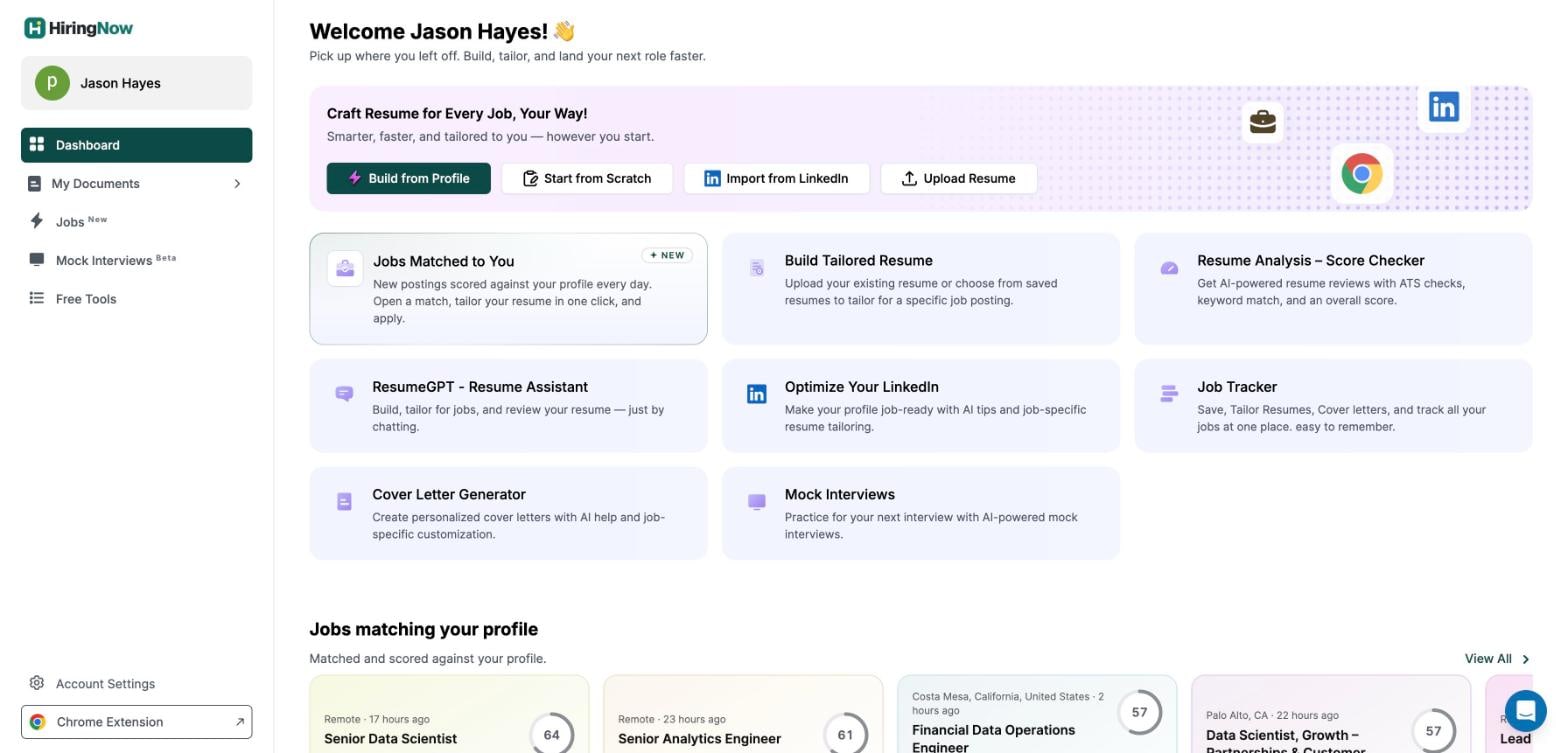
I signed up on the free plan and started from the resume I already had. The dashboard offers four starting points: Build from Profile, Start from Scratch, Import from LinkedIn, or Upload Resume.
From there, a four-step Job preferences panel decides what your matches are built from. Everything came pre-filled from my resume, so my job was to check it rather than type it.
- Roles and level. I picked the Data & Analytics family (Data Analyst, Data Scientist, Data Engineer and Business/BI Analyst) and kept Backend Engineering on as a second track. Chosen roles score highest, and related roles still appear lower down.
- Work style and location. I left remote, hybrid and on-site all switched on, and set my locations to Austin and the US. Switching a work style off removes those jobs completely, so this step is worth a second look.
- Skills. The step that matters most, so it gets its own section below.
- Auto-apply settings. I kept the default, where every application waits for my approval.
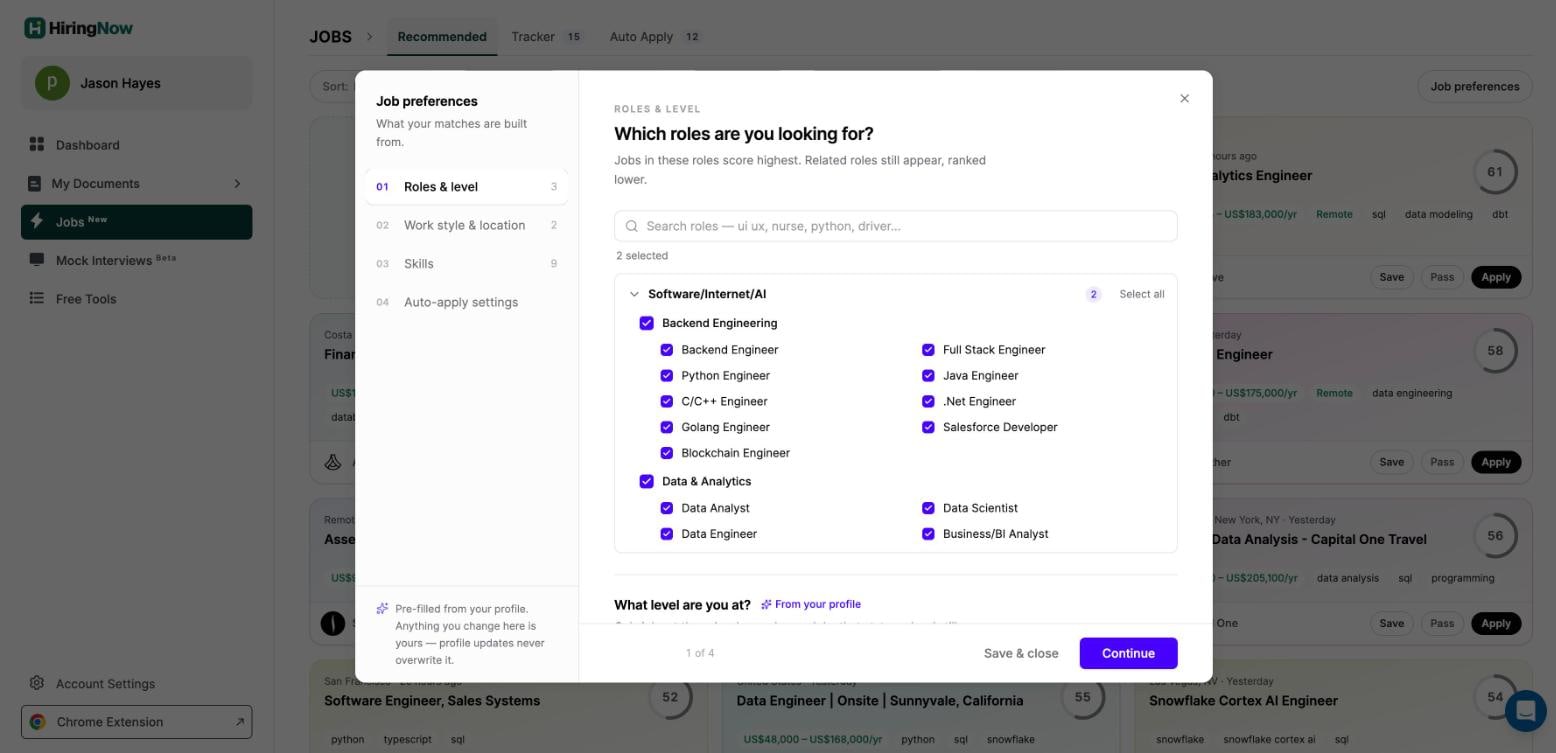
Preferences are pre-filled from your resume, and HiringNow promises later profile updates never overwrite your edits. I set my rules once and they stayed put.
How I picked my skills
HiringNow says plainly that skills "carry the most weight of anything here", so I spent the most time on this step. It had already pulled nine skills from my resume.
They were SQL, Python, dbt, Snowflake, A/B testing, forecasting, pricing analysis, Looker and Tableau. I kept all nine because they are the tools I want to use every day, not ones I touched once.
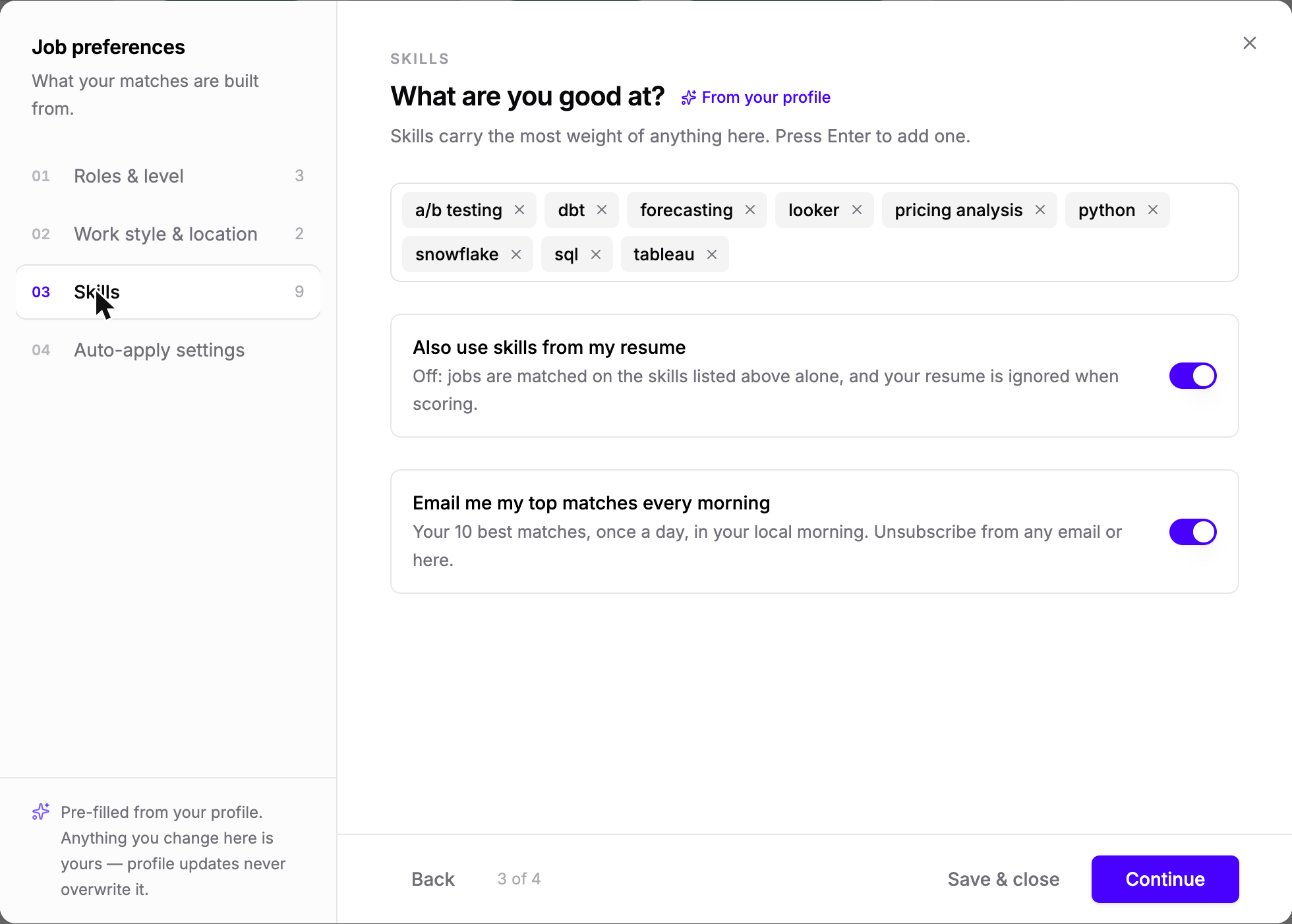
I also left "Also use skills from my resume" switched on, so the rest of my resume counts when jobs are scored. Turning it off matches on your list alone, which helps if your resume covers work you want to move away from.
The last toggle emails your 10 best matches every morning. I kept that on too.
How relevant were my job matches?
Very relevant. Of my top 30 recommendations, 28 were the data roles I asked for, and the other two were engineering roles that fit the backend track I had also picked.
Job alerts tend to drift off topic within a day, so this was the part I was most skeptical about. Instead I got data scientist, analytics engineer, data engineer and data analyst openings at companies like Linktree, SurveyMonkey, Attentive, Capital One, Notion and Figma.
The skills on each card lined up with mine. SQL, Python, dbt and Snowflake came up again and again, and my top match, a Senior Data Scientist role at Linktree, led with A/B testing and experimentation.
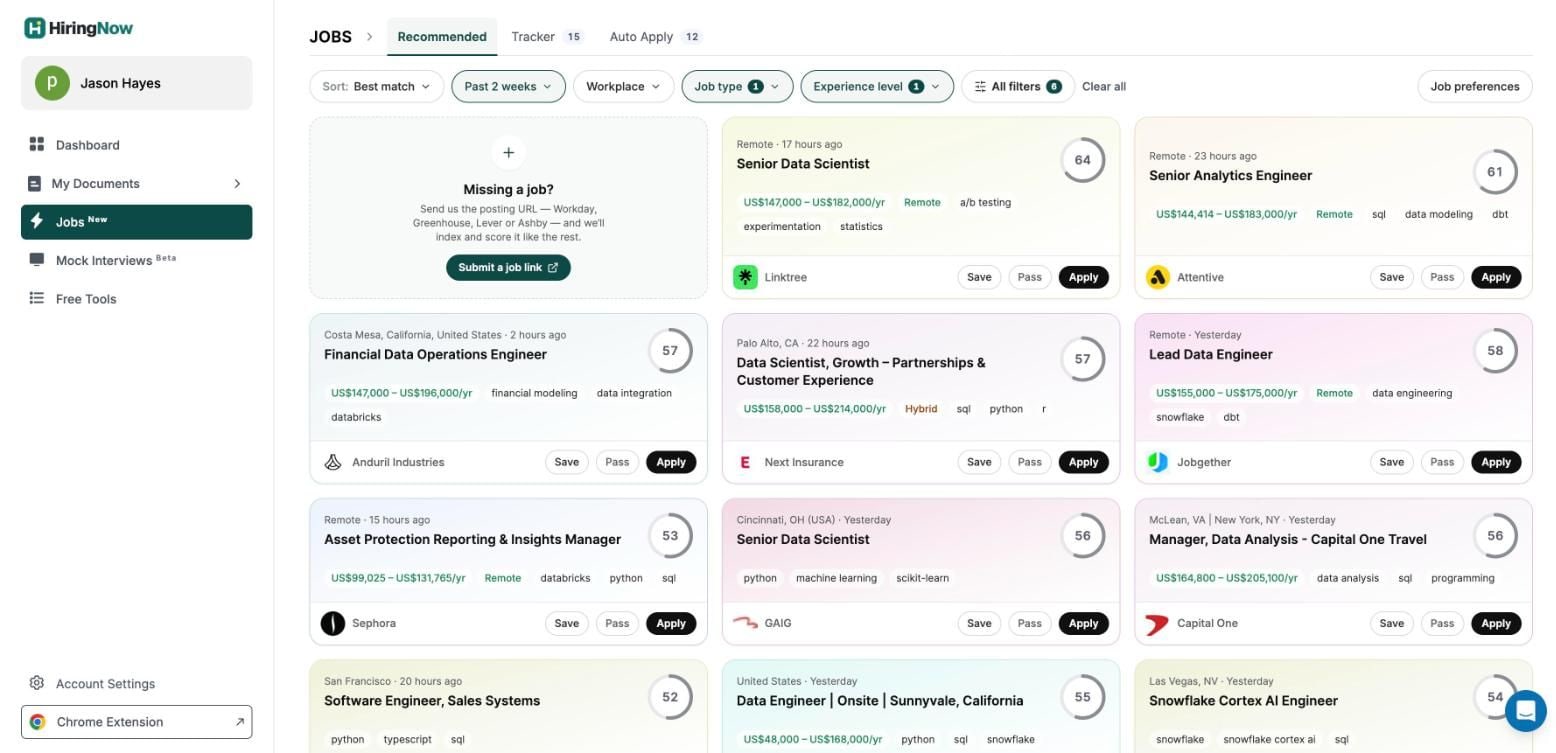
The jobs were fresh, too. Eighteen of the 30 had gone live in the past day, several within the last 7 to 13 hours, and none were more than five days old.
My location settings showed up as expected. A Senior Data Analyst role in Austin made the list, and remote roles open across the US filled most of the rest.
The scores took me a moment to read. They ran from the low 40s up to 64, and nothing was inflated to a 95 just to get me to click.
Opening a job explains the number. The Linktree role carries the label "Stretch match", and the summary card shows it wants 4 to 5 years at senior level, so I knew where I stood before I spent time on it.
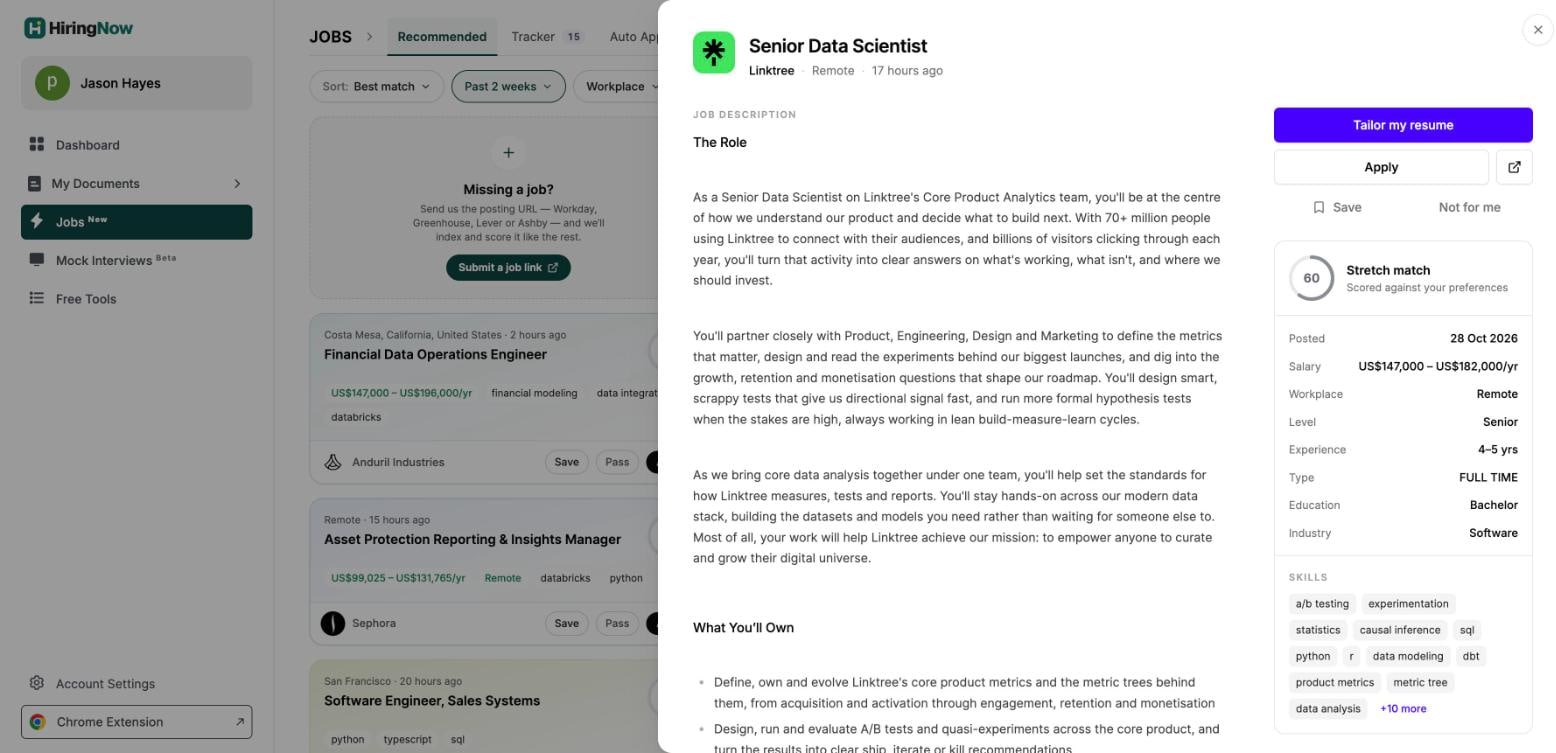
I would rather use a tool that tells me a role is a reach than one that calls everything a perfect fit. It meant my applications went to the jobs that suited me best.
Found a job somewhere else? Paste the posting link from Workday, Greenhouse, Lever or Ashby, and HiringNow indexes and scores it like the rest.
Tailored resumes for every application
HiringNow's AI Resume Builder rewrites your resume for each job description in an ATS-friendly template. Its rule is strict: it rewords experience you already have and adds nothing you did not write.
That is the right call. A tailored resume that invents skills gets you an interview you cannot pass, while one that reorders and rephrases real experience gets you past the screen honestly.
- A copy per application. Each application keeps its own tailored version, so I never overwrote a resume I had already sent.
- Score before you send. The built-in ATS Resume Checker gives an ATS check, keyword match and overall score.
- Matching cover letters. The AI Cover Letter Generator tailors a letter to the same posting.
Auto-apply, with me in control
This is the feature that sets HiringNow apart. Once I approved a job, the agent opened the employer's own application form, filled it in from my profile, attached my tailored resume, and submitted it.
The Auto Apply queue shows every application with its resume version (tailored or original) and its live status. Filters for Submitted, In flight, Needs you, Failed and Skipped make it easy to see what needs your attention.
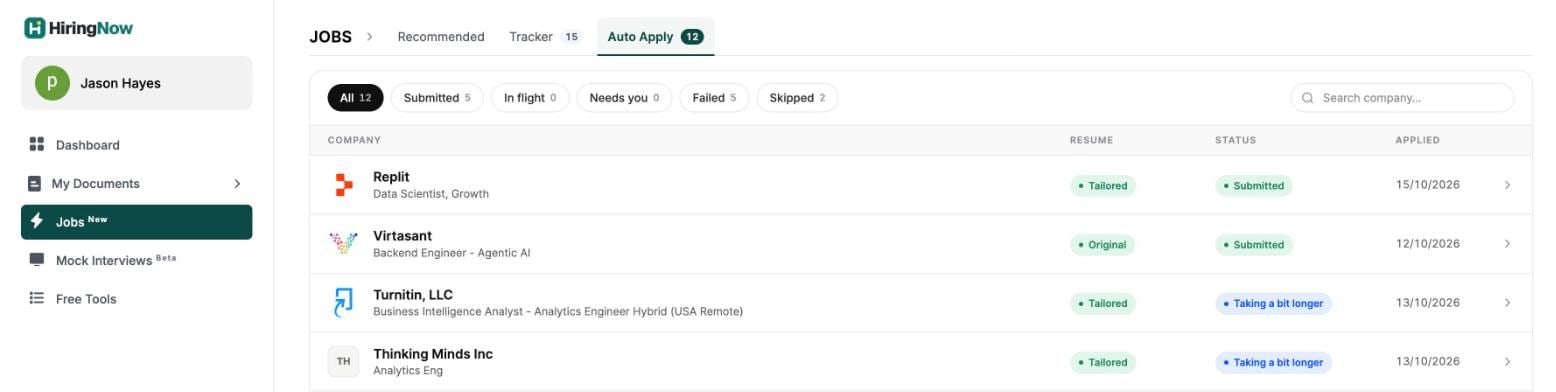
The receipts impressed me most. Open any application and you see all six steps: started, resume tailored, form opened, form read, details filled, and submitted, with the employer's own confirmation message quoted back to you.
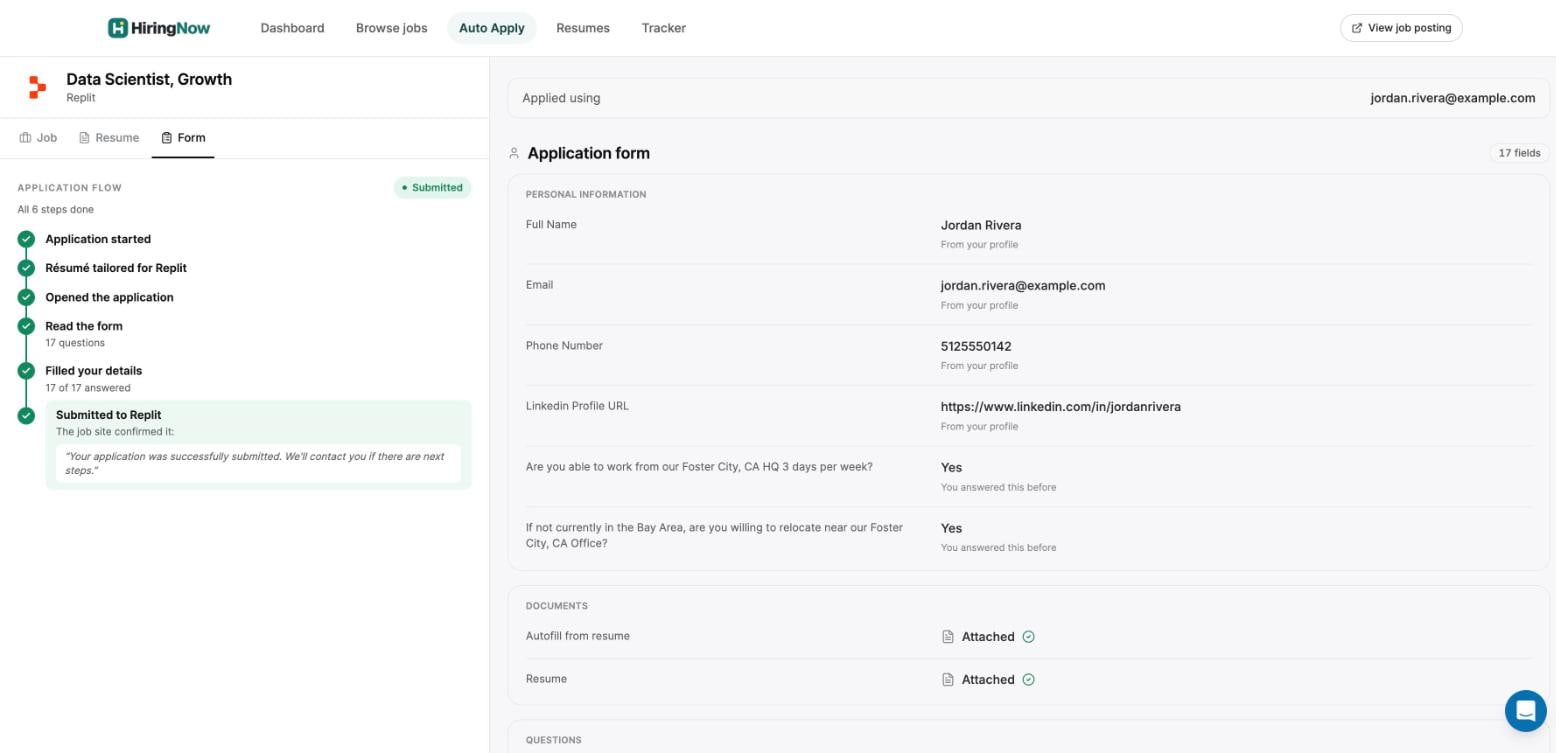
Every field on the receipt shows its source, such as "From your profile" or "You answered this before". When a form asked something my profile did not cover, HiringNow asked me instead of guessing.
Some employers email a code before they show the form. You can connect your inbox so HiringNow catches those codes, with read-only access limited to emails your own applications trigger, and you can disconnect at any time.
Job tracker and the rest of the toolkit
Every job I saved or applied to flowed into the Job Application Tracker, a board with Saved, Applied, Interviewing and Negotiating columns. By the end of the week it held 15 jobs, and I never touched a spreadsheet.
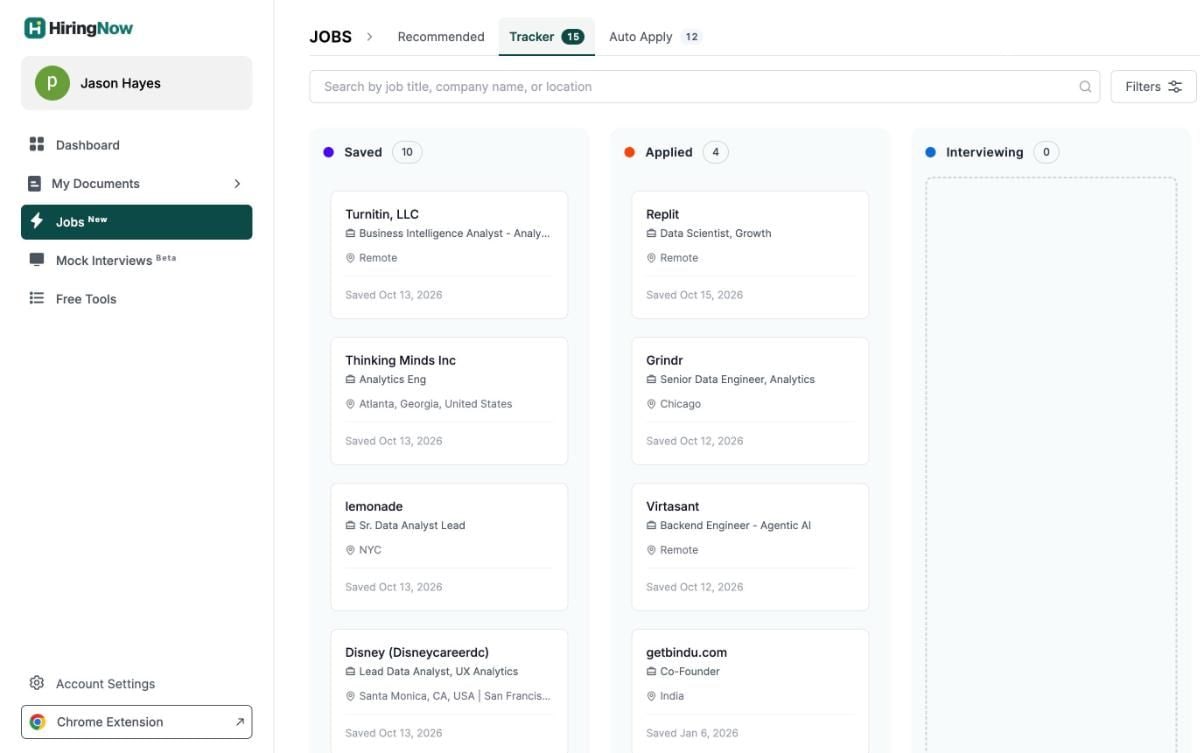
You can switch to a list view, add jobs by hand, and rename the stages. Beyond applying, the dashboard bundles the other tools a job search needs:
- ResumeGPT. A chat assistant that builds, tailors and reviews your resume in plain conversation.
- Optimize your LinkedIn. AI tips to get your profile ready for the jobs you want.
- Mock interviews. Practice with an AI interviewer and get feedback (currently in beta).
- Chrome extension. Autofill applications you start on other sites.
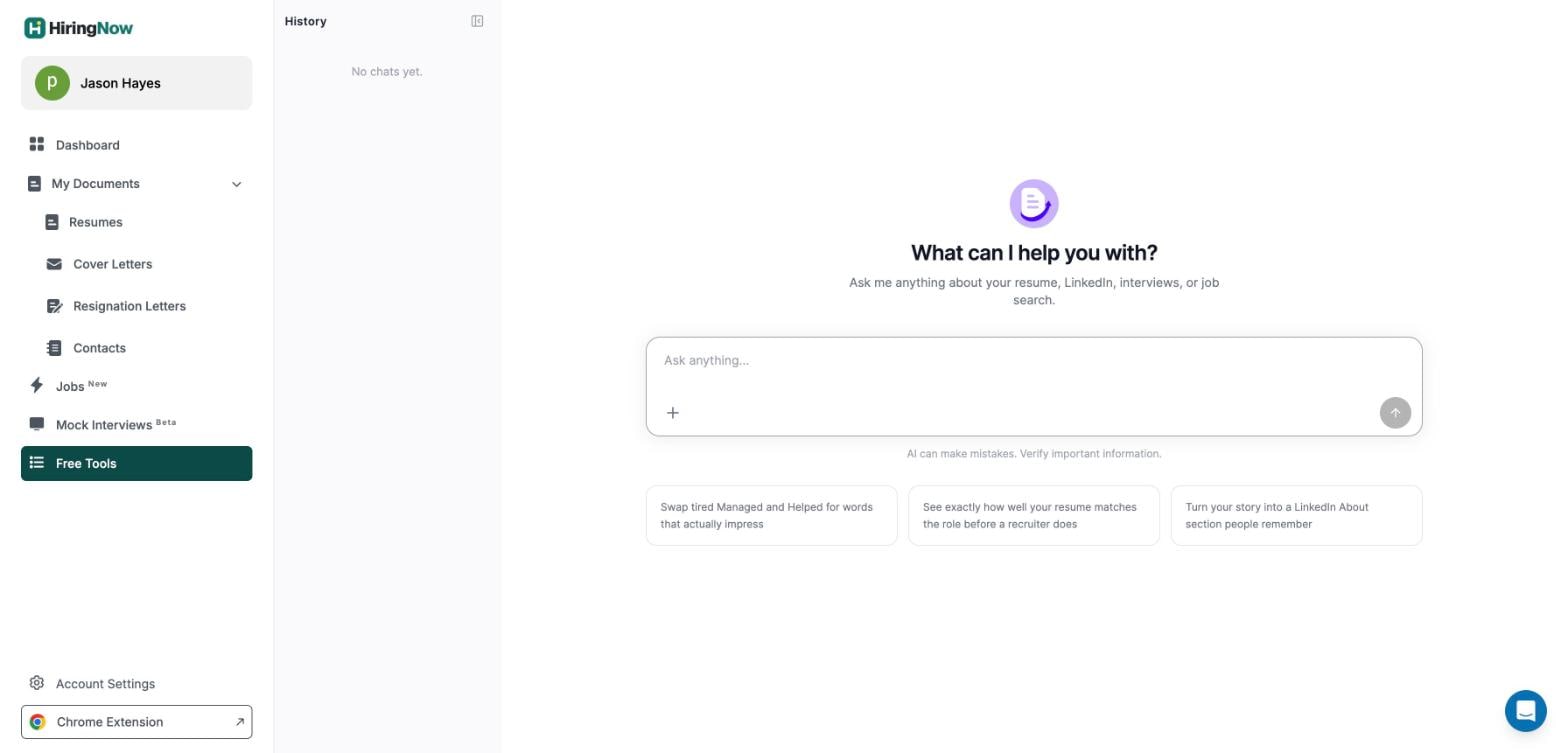
- Documents hub. Resumes, cover letters, resignation letters and contacts in one place.
HiringNow pricing
Every plan includes job matching and a tailored resume per application. The paid tiers differ mainly in how many auto-applies you get each month.
| Plan | Price | Auto-applies | Highlights |
|---|---|---|---|
| Free | $0, no card | 10, one time | Matches, tailored resume and cover letter, tracker, Chrome autofill, ATS score |
| Pro | $29/mo | 100 a month | Unlimited resumes and cover letters, all premium templates, top-up packs |
| Autopilot | $49/mo | 300 a month | Approve each one or approve by your rules, 3 search profiles, instant alerts |
| Autopilot Max | $99/mo | 1,000 a month | 10 search profiles, highest queue priority, priority support |
Prices are in US dollars, and you can cancel anytime. HiringNow lists quarterly billing at a 33% saving, so check the pricing page for current numbers.
The one catch: it is new
HiringNow is a young platform. It does not yet have the years of user reviews, community guides and third-party coverage that older job sites have built up.
You can see the newness in the product too: mock interviews carry a beta label, and the app asks for feedback on match quality. The core flow of matching, tailoring, applying and tracking held up well across my week.
Who should use HiringNow
Based on my week with it, HiringNow is a strong fit if:
- you are in an active search and want to apply in the first hours, not the first weeks,
- you apply to many roles and want each one to get its own tailored resume,
- you want automation but insist on approving what goes out under your name,
- you are tired of tracking applications in a spreadsheet.
It is less essential if you are applying to one or two dream roles. In that case, the free plan's 10 auto-applies and the tailoring tools may be all you need.
If you only need a resume builder rather than a job agent, our roundup of the best resume builders compares the main options, and our FlowCV review covers a strong free pick.
The verdict
After a week, HiringNow earned a place in my job search. It found relevant jobs within hours of posting, scored them honestly, and tailored my resume without inventing anything.
The receipts and the clear Auto Apply queue earned my trust, which matters for any tool that sends applications in your name. Its newness is my only caveat, and the free plan lets you try it with nothing to lose.


Frequently asked questions
What is HiringNow?
HiringNow is an AI job search agent. It finds new jobs on employers' career pages and applicant tracking systems, scores them against your profile, tailors your resume to each role, and applies on the employer's own form once you approve.
How relevant are HiringNow's job matches?
In my week of testing, very. 28 of my top 30 recommendations were in the data roles I chose, and the skills on each card matched the ones in my profile. Scores are conservative, so use them to rank jobs rather than expecting 90s.
Is HiringNow free?
Yes, to start. The free plan includes 10 one-time auto-applies, job matches, a tailored resume and cover letter per application, the tracker, and Chrome autofill, with no credit card. Paid plans start at $29 a month.
Does HiringNow apply to jobs without asking me?
Not by default. Every application waits for your approval, and you can approve, edit, or skip it. An optional automatic mode can pre-approve applications that meet your rules, but it stays off until you turn it on.
Does HiringNow make things up on my resume?
No. HiringNow rewords and reorders the experience you already have to match the job description, and form answers come from your profile. If a form asks something your profile does not cover, it asks you.
Does HiringNow need my LinkedIn or Indeed password?
No. HiringNow applies through the employer's own application form and does not use or require your LinkedIn, Indeed, or email passwords. Connecting your inbox for verification codes is optional and read-only.
Is HiringNow worth it?
For an active job search, yes. Applying within hours of a posting with a resume tailored to it is a real edge, and the receipts show exactly what was sent. Since the platform is new, start on the free plan and upgrade once it proves itself for you.